DeepEval: CI-Gated Typed Metrics for LLM Outputs
Table of Contents
What DeepEval Does
DeepEval is an open-source (Apache-2.0) Python framework for evaluating LLM applications.
- Its own description is “similar to Pytest but specialized for unit testing LLM apps”.
- You describe an interaction as a test case, attach one or more metrics and DeepEval returns a score between 0 and 1, a reason, and a pass/fail against a threshold you control.
- Run it with
deepeval test run(a pytest wrapper), a failing metric will fail the build. - DeepEval’s built-in metrics focus on deterministic structural checks and semantic LLM-judged checks for things like
- faithfulness
- hallucination
- relevancy
- safety
- G-Eval rubrics.
- The documented non-LLM set is small:
- Exact Match
- Pattern Match
- JSON Correctness.
- For things like word counts or substring containment you write a short custom metric (see below).
- A metric scores a test case from 0 to 1 and returns a
reason. - It passes when
score >= threshold(default0.5). - In the current docs every metric points the same way: 1 is a pass, and
thresholdis always a minimum. - Most built-in metrics are LLM-as-a-judge they cost tokens and are not perfectly repeatable. That includes
ToxicityMetricBiasMetric.
- The default judge is OpenAI (the docs list
gpt-5.4as the default model), so you needOPENAI_API_KEYunless you configure another provider. - Use
deepeval test run, not barepytest, for CI. The docs call plainpytest“highly not recommended”. - Pin your judge model, give G-Eval explicit
evaluation_steps, mark noisy metricsflaky=True, and keep your metric list short (the docs recommend five at most).
The Mental Model
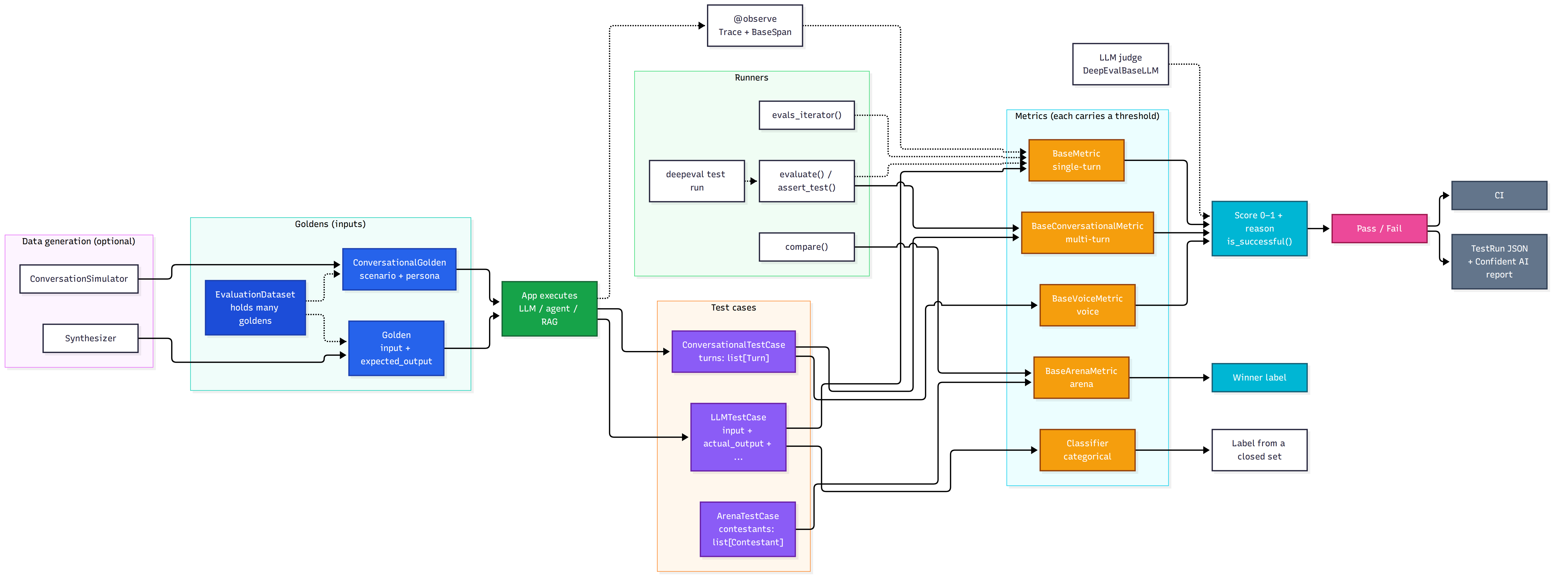
Every metric exposes the same surface:
metric.measure(test_case)      # run it
metric.score                   # float, 0–1
metric.reason                  # natural-language explanation (if include_reason=True)
metric.is_successful()         # score >= threshold
Constructor options shared by most LLM-judged metrics e.g. (FaithfulnessMetric):
| Parameter | Meaning | Default |
|---|---|---|
threshold | Minimum passing score. None = score-only mode: the score and reason are recorded but the metric never decides pass/fail. | 0.5 |
model | An OpenAI model name string, or any DeepEvalBaseLLM. | gpt-5.4 (per docs) |
include_reason | Generate a natural-language reason. | True |
strict_mode | Force a binary score (1 for perfect, else 0) and set the threshold to 1. | False |
async_mode | Run the metric’s internal LLM calls concurrently. | True |
verbose_mode | Print intermediate steps (extracted claims, verdicts) to the console. | False |
flaky | Still compute and report the metric, but never let its failure decide the test case’s status. | False |
evaluation_template | Override the metric’s built-in judge prompts. | built-in |
eval_mode, system_one_model | Choose who judges (see “Eval Modes and Jev”). | configured mode / jev-latest |
- Not every metric has every parameter (the non-LLM ones are much smaller), and metric-specific options are listed per metric below.
Two rules that bite people:
Something must be able to fail.
evaluate()andassert_test()mark a test case as passed only when a metric returnsis_successful()(score >= threshold). A metric withthreshold=Noneruns in score-only mode: it recordsscoreandreason, butis_successful()returnsNoneand the metric never votes on the test case’s status. A metric withflaky=Trueis computed and reported as usual, but its failure never decides that status. If every metric you pass is score-only or flaky, nothing is left to render a verdict, so DeepEval raises an error instead of reporting a silent pass. One gating metric is enough:# raises: neither metric is allowed to decide pass/fail evaluate([tc], [FaithfulnessMetric(threshold=None)]) # score-only evaluate([tc], [AnswerRelevancyMetric(flaky=True)]) # never decides # fine: the first metric only reports, the second gates evaluate([tc], [FaithfulnessMetric(flaky=True), AnswerRelevancyMetric()])LLM metrics need the right test case fields. Missing ones raise errors unless you skip them (
-sflag orErrorConfig(skip_on_missing_params=True)).
When to Use DeepEval
| Scenario | Use DeepEval | Consider something else |
|---|---|---|
| Faithfulness / hallucination / relevancy for RAG | ✅ Built-in metrics | — |
| A custom rubric scored by an LLM | ✅ GEval | — |
| Toxicity, bias and other safety scoring | ✅ Built-in (LLM-judged) | Dedicated red-teaming: DeepTeam (see below) |
| Agent evals (tool use, task completion, traces) | ✅ Trajectory and component metrics | — |
| Multi-turn chatbots | ✅ Conversational metrics and a conversation simulator | — |
| Pytest-style CI gates with minimal code | ✅ assert_test() + deepeval test run | — |
| Declarative, YAML-driven prompt/provider matrices with no code | — | Promptfoo |
| Shared, hosted experiment history and dashboards | Possible via Confident AI (DeepEval’s own commercial platform) | Braintrust, Langfuse and others |
| Property-based invariant testing of your own code | — | hypothesis |
DeepEval is more than a metric library: it also ships datasets (goldens), tracing, a synthetic-data generator, a conversation simulator, benchmarks, a CLI, and a pytest-based runner (deepeval test run). You can still call a single metric from any Python code via metric.measure().
Install and First Test
pip install -U deepeval
export OPENAI_API_KEY="..."        # default judge; see "Choosing a Judge" for alternatives
Create test_chatbot.py:
from deepeval import assert_test
from deepeval.metrics import GEval
from deepeval.test_case import LLMTestCase, SingleTurnParams


def test_refund_answer():
    correctness = GEval(
        name="Correctness",
        criteria="Determine if the 'actual output' is correct based on the 'expected output'.",
        evaluation_params=[SingleTurnParams.ACTUAL_OUTPUT, SingleTurnParams.EXPECTED_OUTPUT],
        threshold=0.5,
    )
    test_case = LLMTestCase(
        input="What if these shoes don't fit?",
        actual_output="You have 30 days to get a full refund at no extra cost.",  # from your app
        expected_output="We offer a 30-day full refund at no extra costs.",
    )
    assert_test(test_case, [correctness])
deepeval test run test_chatbot.py
Housekeeping you will want to know about on day one:
deepeval loginis optional. It connects you to Confident AI (DeepEval’s hosted platform). Once logged in, test results sync to it automatically. See “Confident AI and Privacy”.
Test Cases: LLMTestCase
A single-turn test case represents one atomic interaction. You scope “interaction” however you like: the whole app, just the RAG pipeline, only the retriever.
| Field | Type | Used for |
|---|---|---|
input | str | The user input. Do not include your prompt template, and don’t dump a JSON message list here. |
actual_output | str | What your app produced. Required by nearly every metric. The docs mark it optional only because retriever-only evaluation may not have one. |
expected_output | str | The ideal answer (tone and phrasing included). Needed by reference-based metrics such as ContextualPrecisionMetric, and by G-Eval criteria that compare against it. |
context | list[str] | Static ground truth for this input. Used by HallucinationMetric. This is not generic metadata. |
retrieval_context | list[str] or RetrievedContextData | What your retriever actually returned at runtime. Used by faithfulness and the contextual metrics. RetrievedContextData carries context and source. |
tools_called / expected_tools | list[ToolCall] | Agent evals. ToolCall has name plus optional description, reasoning, output, type (function or MCP) and input_parameters. |
expectations | Expectations(must=[...], must_not=[...]) | Define success directly on the case without picking a metric. Judged by an LLM (or Jev). |
expected_labels | dict[str, str] | Maps a classifier name to the label this case should receive. |
token_cost, completion_time | float | Logged for your own custom metrics or for Confident AI. No built-in metric uses them. |
flaky | bool | Failures print a warning instead of raising AssertionError. |
name, tags | str, list[str] | Labels for filtering on Confident AI. |
context versus retrieval_context is the one people mix up: context is the ideal knowledge you supply, retrieval_context is what the retriever actually fetched. Comparing the two is how you assess retrieval.
Images are supported through MLLMImage embedded in input / actual_output (f-string embedding), and multimodal test cases are detected automatically for metrics that support them.
Metrics select the fields a judge sees through an enum of evaluation parameters. - SingleTurnParams is the single-turn set: INPUT, ACTUAL_OUTPUT, EXPECTED_OUTPUT, CONTEXT, RETRIEVAL_CONTEXT, METADATA, TAGS, TOOLS_CALLED, EXPECTED_TOOLS, and the MCP fields MCP_SERVERS, MCP_TOOLS_CALLED, MCP_RESOURCES_CALLED, MCP_PROMPTS_CALLED. - MultiTurnParams is the conversational set: ROLE, CONTENT, METADATA, TAGS, SCENARIO, EXPECTED_OUTCOME, CONTEXT, USER_DESCRIPTION, RETRIEVAL_CONTEXT, CHATBOT_ROLE, TOOLS_CALLED, MCP_TOOLS, MCP_RESOURCES, MCP_PROMPTS. The older names LLMTestCaseParams and TurnParams still resolve to SingleTurnParams and MultiTurnParams, but emit a DeprecationWarning.
Datasets and Goldens
A Golden is DeepEval’s name for a pending test case (datasets docs). Goldens represent a more flexible alternative to test cases in the deepeval, and is the preferred way to initialize a dataset. Unlike test cases, goldens:
- Only require input/scenario to initialize
- Store expected results like expected_output/expected_outcome
- Serve as templates before becoming fully-formed test cases
Goldens excel in development workflows where you need to:
- Evaluate changes across different iterations of your LLM application
- Compare performance between model versions
- Test with inputs that haven’t yet been processed by your LLM
Think of goldens as “pending test cases” - they contain all the input data and expected results, but are missing the dynamic elements (actual_output, retrieval_context, tools_called) that will be generated when your LLM processes them.
“Pending” means the test case is not complete yet: a golden holds only the parts you know before your app runs — the input and the expected results — and omits the dynamic fields (actual_output, retrieval_context, tools_called) that your app produces at run time. Building an LLMTestCase from the golden fills those in and turns it into a complete test case. Goldens are the documented preferred way to build a dataset because you can re-run the same set across prompts, models and releases.
from deepeval.dataset import EvaluationDataset, Golden

dataset = EvaluationDataset(goldens=[
    Golden(input="What if these shoes don't fit?", expected_output="30-day full refund."),
    Golden(input="Do you ship internationally?"),
])
Converting a golden into a test case is a two-part split: the static fields copy straight across, and the dynamic fields come from your app.
from deepeval.test_case import LLMTestCase

golden = Golden(input="What if these shoes don't fit?", expected_output="30-day full refund.")

test_case = LLMTestCase(
    input=golden.input,                                 # static: from the golden
    expected_output=golden.expected_output,             # static: from the golden
    actual_output=chatbot.run(golden.input),            # dynamic: from your app
    retrieval_context=retriever.search(golden.input),   # dynamic: from your app
)
test_case now has all five fields, so metrics that need the dynamic ones can run. The golden still has only input and expected_output, so you can reuse it for the next prompt or model.
Facts worth knowing:
- A dataset is either single-turn (
Golden) or multi-turn (ConversationalGolden), never both. Mixed files raise an error. Goldenfields:input,expected_output,context,expected_tools,expected_labels,expectations, plusadditional_metadata,comments,custom_column_key_values. AConversationalGoldenhasscenario,expected_outcome,personaand similar. Leaveactual_output,retrieval_contextandtools_calledto be generated at run time.- Load:
dataset.pull(alias=...)(Confident AI),add_goldens_from_json_file,add_goldens_from_jsonl_file,add_goldens_from_csv_file, andadd_test_cases_from_json_file/add_test_cases_from_csv_file(with*_key_name/*_col_namearguments for custom schemas). - Save:
dataset.save_as(file_type="json" | "csv" | "jsonl", directory=..., file_name=..., include_test_cases=False)ordataset.push(alias=...)to Confident AI. - Generate:
Synthesizer().generate_goldens_from_docs(...), plus_from_contexts,_from_scratchand_from_goldens; the same is available from the CLI asdeepeval generate --method docs|contexts|scratch|goldens --variation single-turn|multi-turn. For multi-turn, useConversationSimulator. - Dataset curation advice from the docs: cover real-world inputs, varying complexity and edge cases; keep scope focused; align with a clear objective. If you have nothing yet, start by writing down the prompts you currently eyeball by hand.
The Metric Catalogue
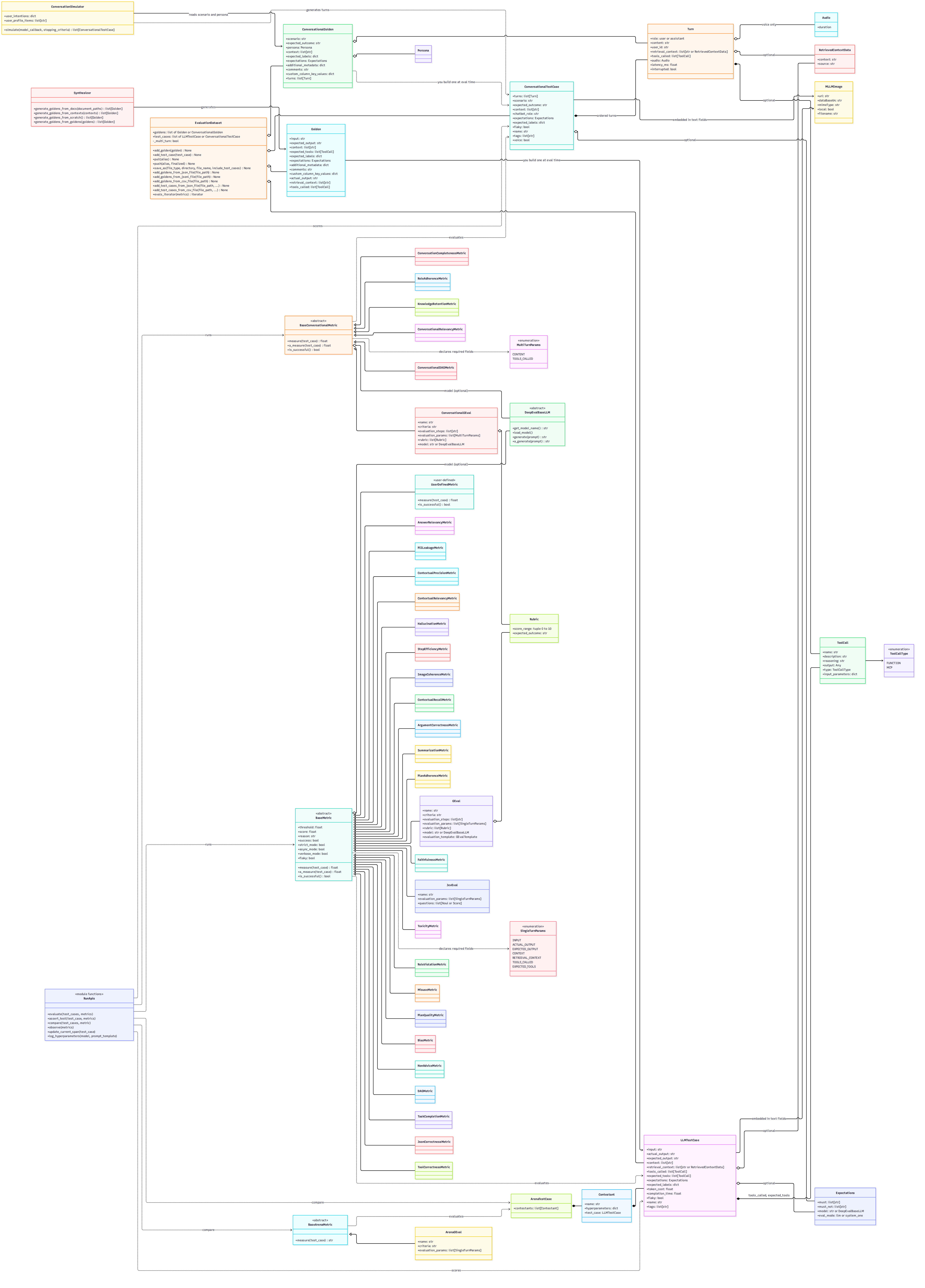
The docs advertise “50+” metrics. Every metric is a subclass of one of three base classes, so the catalogue is easiest to read by starting from the base class and working down to the concrete metrics. The v4.2.8 release exposes the classes below.
| Category | Base class | measure() takes | Returns |
|---|---|---|---|
| Single-turn | BaseMetric | LLMTestCase | score 0-1 |
| Multi-turn | BaseConversationalMetric | ConversationalTestCase | score 0-1 |
| Voice | BaseVoiceMetric (extends BaseConversationalMetric) | ConversationalTestCase | score 0-1 |
| Arena | BaseArenaMetric | ArenaTestCase | winner label |
PromptMixin is a shared mixin that renders prompts, and Verdict is the yes/no enum that QAG metrics use. Neither is a metric.
Single-turn metrics (BaseMetric)
Take an LLMTestCase and return a score between 0 and 1.
| Metric | What it is | Docs |
|---|---|---|
GEval | LLM-as-a-judge from plain-language criteria via chain-of-thought evaluation steps. Not deterministic. | docs |
DAGMetric | Decision tree of LLM-judged nodes for more deterministic, rule-like scoring. | docs |
JevEval | Custom criteria expressed as bounded questions and scored by Jev (a System One model) instead of an LLM. | docs |
AnswerRelevancyMetric | Is the answer on-topic for the input? | docs |
FaithfulnessMetric | Is the answer grounded in the retrieved context? | docs |
ContextualRelevancyMetric | How much of the retrieved context is relevant to the input? | docs |
ContextualPrecisionMetric | Are relevant chunks ranked above irrelevant ones? | docs |
ContextualRecallMetric | Did retrieval capture everything the expected answer needs? | docs |
RagasMetric | Average of the RAGAS metrics. Import from deepeval.metrics.ragas, which also exposes RAGASAnswerRelevancyMetric, RAGASFaithfulnessMetric, RAGASContextualPrecisionMetric, RAGASContextualRecallMetric and RAGASContextualEntitiesRecall. | docs |
TaskCompletionMetric | Did the agent accomplish the task? Requires tracing. | docs |
StepEfficiencyMetric | Did the agent avoid unnecessary or redundant steps? Requires tracing. | docs |
PlanAdherenceMetric | Did the agent follow its own plan? Requires tracing. | docs |
PlanQualityMetric | Was the plan logical, complete and efficient? Requires tracing. | docs |
ToolCorrectnessMetric | Did the agent choose the right tools? Needs tools_called / expected_tools. | docs |
ArgumentCorrectnessMetric | Did the agent pass the right arguments to its tools? | docs |
ToolPermissionMetric | Deterministic allowlist/denylist check that the agent called only authorized tools. | docs |
AgentLoopDetectionMetric | Deterministic detection of an agent stuck in a loop, read from its trace. Requires tracing. | docs |
MCPUseMetric | Did the agent use its MCP servers effectively? | docs |
BiasMetric | Does the output contain gender, racial or political bias? | docs |
ToxicityMetric | Does the output contain toxic content? | docs |
NonAdviceMetric | Does the output give inappropriate professional advice? | docs |
MisuseMetric | Is the specialised-domain chatbot being misused? | docs |
PIILeakageMetric | Does the output leak personal or privacy-sensitive data? | docs |
RoleViolationMetric | Does the output break the assigned role or character? | docs |
TextToImageMetric | Quality of a generated image (semantic consistency and perceptual quality). | docs |
ImageEditingMetric | Quality of an edited image. | docs |
ImageCoherenceMetric | Do images align coherently with their accompanying text? | docs |
ImageHelpfulnessMetric | Do images help the reader understand the text? | docs |
ImageReferenceMetric | Does the text accurately refer to or explain the images? | docs |
HallucinationMetric | Does the output contradict the supplied ground-truth context? | docs |
SummarizationMetric | Is the summary factually correct and complete? | docs |
PromptAlignmentMetric | Does the output follow the instructions in the prompt template? | docs |
ExactMatchMetric | Does the output match the expected output exactly? | docs |
PatternMatchMetric | Does the output fully match a regex (re.fullmatch)? | docs |
JsonCorrectnessMetric | Does the output load into your pydantic schema? | docs |
CitationFaithfulnessMetric | Do [N] citation markers point to the passage that supports the claim? Import from deepeval.metrics.community. | docs |
Multi-turn metrics (BaseConversationalMetric)
Take a ConversationalTestCase and return a score between 0 and 1.
| Metric | What it is | Docs |
|---|---|---|
ConversationalGEval | GEval for multi-turn conversations. | docs |
ConversationalDAGMetric | DAGMetric for multi-turn conversations. | docs |
ConversationalJevEval | JevEval for multi-turn conversations. | docs |
KnowledgeRetentionMetric | Does the chatbot retain facts across the conversation? | docs |
ConversationCompletenessMetric | Did the chatbot satisfy the user’s needs end to end? | docs |
RoleAdherenceMetric | Does the chatbot stay in its assigned role? | docs |
TurnRelevancyMetric | Is each assistant turn relevant to the user? | docs |
TurnFaithfulnessMetric | Is each assistant turn grounded in the retrieved context? | docs |
TurnContextualPrecisionMetric | Are relevant retrieved nodes ranked above irrelevant ones per turn? | docs |
TurnContextualRecallMetric | Does retrieval contain enough to support the expected outcome per turn? | docs |
TurnContextualRelevancyMetric | Is the retrieved context relevant to the user input per turn? | docs |
GoalAccuracyMetric | Did the agent reach the goal across a conversation? | docs |
ToolUseMetric | Tool selection and argument quality across a conversation. | docs |
TopicAdherenceMetric | Did the agent stay on the defined topics? | docs |
MCPTaskCompletionMetric | Did the MCP-based agent accomplish the task? | docs |
MultiTurnMCPUseMetric | MCP server use across a conversation. | docs |
TranscriptionAccuracyMetric | Did the agent’s speech-to-text hear the caller correctly? | docs |
Voice metrics (BaseVoiceMetric)
A voice sub-base that extends BaseConversationalMetric, so these also take a ConversationalTestCase.
| Metric | What it is | Docs |
|---|---|---|
VoiceNaturalnessMetric | How naturally does the agent speak? | docs |
TurnTakingNaturalnessMetric | Are the gaps and overlaps between speakers natural? | docs |
SpeechIntelligibilityMetric | How easy is the agent to hear and understand? | docs |
VoiceConsistencyMetric | Does the agent sound like the same speaker throughout the call? | docs |
AgentResponsivenessMetric | Did the voice agent answer when spoken to? | docs |
AudioIntegrityMetric | Did the call audio arrive intact (no dropped, clipped or looping audio)? | docs |
VoiceReliabilityMetric | Operational summary combining agent responsiveness and audio integrity. | docs |
Arena metrics (BaseArenaMetric)
Take an ArenaTestCase and return the winning contestant’s label instead of a 0-1 score.
| Metric | What it is | Docs |
|---|---|---|
ArenaGEval | G-Eval variant that picks the better of two contestants using blinded randomized positions. | docs |
Catalogue notes
- Custom metrics: subclass
BaseMetric(orBaseConversationalMetric) to write a fully self-coded metric such as BLEU or ROUGE. See the custom metrics page. - Trace metrics (
TaskCompletionMetric,StepEfficiencyMetric,PlanAdherenceMetric,PlanQualityMetric,AgentLoopDetectionMetric) require LLM tracing, because they judge the complete ordered trace rather than a single test case. - RAGAS metrics are not re-exported from
deepeval.metrics; importRagasMetric(and the fiveRAGAS*classes) fromdeepeval.metrics.ragas. - Community metrics live under
deepeval.metrics.community. In the released v4.2.8 package that module exports onlyCitationFaithfulnessMetric;ToolPermissionMetricandAgentLoopDetectionMetricare still exported from top-leveldeepeval.metrics. The documentation already shows the futuredeepeval.metrics.communityimport path for all three.
How the scores are computed
| Metric | Score |
|---|---|
| Faithfulness | truthful claims ÷ total claims in actual_output |
| Hallucination | contexts the output does not contradict ÷ total contexts |
| Toxicity | non-toxic opinions ÷ total opinions |
| Bias | unbiased opinions ÷ total opinions |
| Contextual Relevancy | relevant statements ÷ total statements in retrieval_context |
| Contextual Precision | weighted cumulative precision, rewarding relevant chunks that appear early |
| JSON Correctness / Pattern Match | 1 if valid / fully matches, otherwise 0 |
| G-Eval | judge score weighted by output-token probabilities (see below) |
LLM-judged metrics typically make several calls: for example faithfulness first extracts the claims in your output, then classifies each against the context, then writes a reason. That matters for cost.
Faithfulness vs. Hallucination (Don’t Mix Them Up)
Both ask “did the model make things up?”, but against different sources of truth:
FaithfulnessMetric | HallucinationMetric | |
|---|---|---|
| Compares output to | retrieval_context (what your retriever fetched at runtime) | context (curated ground truth you supply) |
| Use for | RAG pipelines | Cases where you have known-correct reference material |
| Measures | The generator given retrieved text | Contradictions with trusted context |
| Don’t use when | You have no retrieval context | Your “context” is noisy retrieved chunks |
from deepeval.metrics import FaithfulnessMetric
from deepeval.test_case import LLMTestCase

metric = FaithfulnessMetric(threshold=0.7, model="gpt-4.1", include_reason=True)

test_case = LLMTestCase(
    input="Summarise the Q3 earnings report.",
    actual_output="Q3 revenue grew 12% to $2.1B, driven by cloud services.",
    retrieval_context=["Q3 earnings: revenue $2.1B, up 12% YoY, led by cloud segment."],
)

metric.measure(test_case)
print(metric.score, metric.is_successful())
print(metric.reason)
Faithfulness-specific options: truths_extraction_limit (cap how many truths are extracted from the context, ordered by importance) and penalize_ambiguous_claims (don’t count ambiguous claims as faithful).
Behaviour to understand before you trust a score:
- The docs define a claim as truthful when it does not contradict the retrieved context, but their FAQ also warns that a true real-world fact that is simply absent from the retrieved text can still be marked unfaithful. Treat it as a grounding check and read
reason(or turn onverbose_mode) for borderline cases. - A low score is a generation problem (prompt or model), not a retrieval problem. Retrieval is covered by the contextual metrics.
from deepeval.metrics import HallucinationMetric

metric = HallucinationMetric(threshold=0.5)
test_case = LLMTestCase(
    input="What was the blond doing?",
    actual_output="A blond drinking water in public.",
    context=["A man with blond-hair, and a brown shirt drinking out of a public water fountain."],
)
For hallucination, higher is better: the score is the fraction of context documents the output stays consistent with, so 1 is perfect and the threshold is a minimum.
G-Eval: Your Own Rubric
G-Eval (from the paper “NLG Evaluation using GPT-4 with Better Human Alignment”, where the G stands for GPT, so it is not an initialism) lets you write criteria in everyday language. The algorithm first turns your criteria into chain-of-thought evaluation steps, then scores the output; DeepEval normalises the score using the judge’s output-token probabilities when the model supports it (OpenAI models do; custom models need a_generate_raw_response implemented to get the same effect).
from deepeval.metrics import GEval
from deepeval.test_case import LLMTestCase, SingleTurnParams

plain_language = GEval(
    name="Plain language",
    evaluation_steps=[
        "Check that the answer avoids jargon, or defines it when used.",
        "Penalise unexplained acronyms.",
        "Prefer short sentences over dense paragraphs.",
    ],
    evaluation_params=[SingleTurnParams.ACTUAL_OUTPUT],
    threshold=0.7,
)

test_case = LLMTestCase(
    input="Explain Kubernetes in simple terms.",
    actual_output=(
        "Kubernetes orchestrates containerised applications across a cluster of machines. "
        "It handles deployment, scaling, and networking so you do not have to."
    ),
)
plain_language.measure(test_case)
print(plain_language.score, plain_language.reason)
Rules and options:
- Provide either
criteriaorevaluation_steps, not both. With onlycriteria, G-Eval regenerates its steps on every run, which is the usual cause of score drift. Start with a shortcriteria, inspect the generated steps, then lock them in asevaluation_steps. evaluation_paramsshould list only the fields your criteria actually mention. Extra fields feed the judge irrelevant context and degrade the score.rubric=[Rubric(score_range=(0, 2), expected_outcome="..."), ...]confines the judge to bands on a 0–10 scale (inclusive, non-overlapping), which fights the tendency to cluster in the middle. Import withfrom deepeval.metrics.g_eval import Rubric.strict_mode=Trueforces a binary 1/0.- G-Eval is not deterministic. For rule-like determinism use
DAGMetric. - G-Eval always runs as an LLM judge regardless of the global eval mode.
ConversationalGEvaltakes the whole conversation (MultiTurnParams.CONTENT, etc.) and returns one score, not one per turn.- Trajectory mode: omit
evaluation_paramsand pass the metric toevals_iterator()to judge the whole trace (tool choice, arguments, use of retrieved results). On a plainLLMTestCasethis raisesMissingTestCaseParamsError.
A tip from writing this post: don’t ask an LLM judge to count things. “The answer must be under three sentences” is a deterministic check. Write it as code, and save G-Eval for genuinely subjective criteria (tone, clarity, helpfulness).
A working example of G-Eval keeping two artifacts aligned lives in the evaligator repo: the markdown algorithm spec becomes the test case’s expected_output, the Python implementation becomes its actual_output, and the judge scores whether the code implements the documented behaviour.
Deterministic, Non-LLM Metrics
These need no judge model at scoring time:
from pydantic import BaseModel
from deepeval.metrics import JsonCorrectnessMetric, PatternMatchMetric
from deepeval.test_case import LLMTestCase

class User(BaseModel):
    name: str
    age: int

json_ok = JsonCorrectnessMetric(expected_schema=User, include_reason=False)
iso_date = PatternMatchMetric(pattern=r"\d{4}-\d{2}-\d{2}")   # threshold defaults to 1.0

tc = LLMTestCase(input="Return a user", actual_output='{"name": "Ada", "age": 36}')
json_ok.measure(tc)      # 1 if the output loads into the schema, else 0
PatternMatchMetricusesre.fullmatch, so the pattern must match the entire output.\d+fails on"The code is 1234"; use.*\d+.*for fragments. It needs no model or API key (I ran it with no key set).JsonCorrectnessMetricscores by loading the output into yourpydanticschema (wrap a list schema inRootModel[List[...]]). Themodelis only used to write the reason for an invalid output. However, constructing the metric still initialises the default judge, so it raisesDeepEvalErrorif no OpenAI key (or other configured judge) exists, even withinclude_reason=False. With a key present, scoring itself ran offline in my test.ExactMatchMetricis for a single literal answer.
Safety Metrics: Toxicity and Bias
from deepeval.metrics import ToxicityMetric, BiasMetric

toxicity = ToxicityMetric(threshold=0.5)
bias = BiasMetric(threshold=0.5)
Corrections to a common assumption: both are LLM-as-a-judge metrics, not fast deterministic classifiers. Each first has an LLM extract the opinions in actual_output, then classifies each opinion. They need only input and actual_output (referenceless), so they are usable on live traffic.
- Direction: the score is the share of opinions that are not toxic (or biased). 1 means none found. The threshold is a minimum.
- Toxicity rubric: personal attacks, mockery, hate, dismissive statements, threats or intimidation.
- Bias rubric: gender, political, racial/ethnic and geographical bias.
- Only opinions are scored. A verifiable fact, a mistaken statement of fact, or an attributed quote is not an opinion, so reported statements generally aren’t flagged.
- The docs recommend a high-reasoning judge model for Bias, because borderline facts can read as opinions.
- Blunt-but-fair feedback can trigger false positives; lowering the threshold and reading
reasonare the documented remedies. - An output can be toxic without being biased and vice versa, so suites often run both.
Red-teaming at scale is a separate project: the docs point to DeepTeam (“DeepEval but for red teaming LLMs”).
Agents: Tracing and Trajectory Evals
Tracing lets DeepEval build the test case for you from a real run and score the whole trace or individual spans.
from deepeval.dataset import EvaluationDataset, Golden
from deepeval.metrics import TaskCompletionMetric
from deepeval.tracing import observe, update_current_span
from deepeval.test_case import LLMTestCase

dataset = EvaluationDataset(goldens=[Golden(input="Plan a two-day trip to Paris")])

@observe()
def planner(query: str) -> list[str]:
    @observe()
    def itinerary(destination: str, days: int):
        out = ["Eiffel Tower", "Louvre", "Montmartre"][:days]
        update_current_span(test_case=LLMTestCase(input=query, actual_output=str(out)))
        return out
    return itinerary("Paris", 2)

for golden in dataset.evals_iterator(metrics=[TaskCompletionMetric(threshold=0.5)]):
    planner(golden.input)
Three scopes, same metrics:
- End-to-end: treat the app as a black box, metrics on the trace.
- Trajectory: metrics judge the full ordered trace (task completion, step efficiency, plan adherence, plan quality).
- Component-level:
@observe(metrics=[...])attaches a metric to one span (retriever, tool call, sub-agent) and the test case is set at run time withupdate_current_span(test_case=...).
For top-level traces you can set test case fields with update_current_trace(input=..., output=...).
Framework integrations listed in the docs: OpenAI, OpenAI Agents, LangChain, LangGraph, Pydantic AI, CrewAI, Anthropic, AWS AgentCore, LlamaIndex, Google ADK and Strands. For Anthropic you swap in the drop-in client and wrap calls in trace():
from deepeval.anthropic import Anthropic
from deepeval.tracing import trace
from deepeval.metrics import TaskCompletionMetric

client = Anthropic()
for golden in dataset.evals_iterator():
    with trace(metrics=[TaskCompletionMetric()]):
        client.messages.create(
            model="<your-model>",
            max_tokens=1024,
            messages=[{"role": "user", "content": golden.input}],
        )
deepeval inspect opens the most recent traced run in a terminal UI (scores, reasons, tool calls, retriever context). It needs pip install 'deepeval[inspect]'.
Multi-Turn Chatbots
from deepeval import assert_test
from deepeval.metrics import TurnRelevancyMetric
from deepeval.test_case import ConversationalTestCase, Turn

convo = ConversationalTestCase(turns=[
    Turn(role="user", content="My order arrived a week late. I want a refund."),
    Turn(role="assistant", content="Sorry about that. What is your order number?"),
    Turn(role="user", content="It's 4471."),
    Turn(role="assistant", content="Thanks, I've issued a full refund. It'll land in 5-7 days."),
])
assert_test(test_case=convo, metrics=[TurnRelevancyMetric()])
To generate conversations instead of hand-writing them, wrap your chatbot in an async model_callback(input, turns, thread_id) -> Turn and run ConversationSimulator(model_callback=...).simulate(conversational_goldens=..., max_user_simulations=10). Neither LLMTestCase nor ConversationalTestCase can be passed to the other family’s metrics.
Running Evals
There are four ways to execute metrics:
| Approach | Use it for | Notes |
|---|---|---|
metric.measure(test_case) | Debugging, notebooks, your own pipeline | No testing reports, caching or other run-level optimisations. |
evaluate(test_cases=..., metrics=...) | Scripts and notebooks | Collects results and never fails anything. |
assert_test(...) + deepeval test run | CI gating | Raises AssertionError when a metric is below threshold. |
dataset.evals_iterator(metrics=...) | Traced apps | Loop over goldens and call your instrumented app. |
assert_test() has two shapes: assert_test(test_case=..., metrics=[...]) (you build the test case) and assert_test(golden=..., metrics=[...]) (after running a traced app on that golden). run_async defaults to True, which calls each metric’s a_measure(). That matters for custom metrics (below).
evaluate() also accepts hyperparameters, identifier, official, and four config objects from deepeval.evaluate:
| Config | Fields (as of 4.2.8) |
|---|---|
AsyncConfig | run_async=True, throttle_value=0 (seconds), max_concurrent=20. Lower concurrency or add throttling for rate limits. |
DisplayConfig | show_indicator, print_results, verbose_mode, display_option (all / failing / passing), results_folder, results_subfolder, truncate_passing_cases, inspect_after_run, file_type (html / md), file_output_dir. |
ErrorConfig | ignore_errors=False, skip_on_missing_params=False |
CacheConfig | use_cache=False, write_cache=True |
Docs discrepancy: the flags-and-configs page names the display field display, but the installed 4.2.8 signature is display_option. Trust inspect.signature over prose.
Local results
Set DisplayConfig(results_folder="./evals/prompt-v3") and each run is saved as test_run_<YYYYMMDD_HHMMSS>.json (I confirmed the filename). Prefer one queryable file? deepeval set-local-store sqlite (or DEEPEVAL_LOCAL_STORE=sqlite) appends runs to a deepeval.db. deepeval inspect --list shows stored runs. Hyperparameters, per-case scores and reasons are all in the saved files, which also makes them easy for a coding agent to read.
Hyperparameters
Log what you changed so runs are comparable: pass hyperparameters={"model": ..., "temperature": ...} to evaluate(), or under deepeval test run use the decorator anywhere in the test file:
import deepeval

@deepeval.log_hyperparameters
def hyperparameters():
    return {"model": "gpt-4.1", "temperature": 0.7}
CI Gate
Pytest pattern
# tests/evals/test_support_bot.py
import pytest
from deepeval import assert_test
from deepeval.dataset import EvaluationDataset, Golden
from deepeval.metrics import FaithfulnessMetric, GEval
from deepeval.test_case import LLMTestCase, SingleTurnParams

from my_app import answer_with_sources   # returns (answer, retrieved_chunks)

dataset = EvaluationDataset(goldens=[
    Golden(input="What if these shoes don't fit?"),
    Golden(input="How long does shipping take?"),
])

@pytest.mark.parametrize("golden", dataset.goldens)
def test_support_bot(golden: Golden):
    answer, chunks = answer_with_sources(golden.input)
    test_case = LLMTestCase(
        input=golden.input,
        actual_output=answer,
        retrieval_context=chunks,
    )
    assert_test(
        test_case=test_case,
        metrics=[
            FaithfulnessMetric(threshold=0.8, model="gpt-4.1"),
            GEval(
                name="Polite and direct",
                evaluation_steps=["Check the tone is courteous.", "Check the answer is direct."],
                evaluation_params=[SingleTurnParams.ACTUAL_OUTPUT],
                threshold=0.7,
                flaky=True,          # tracked, but never fails the build
            ),
        ],
    )

@deepeval.log_hyperparameters
def hyperparameters():
    return {"model": "gpt-4.1", "prompt_version": "v7"}
deepeval test run tests/evals -n 4 -id "my-run-id"
If any non-flaky metric is below its threshold the assertion fails and CI goes red.
deepeval test run flags
| Flag | Effect |
|---|---|
-n <N> | Run in N parallel processes (pytest-xdist). |
-c | Use the local cache instead of re-evaluating identical test cases and metric configs. |
-i | Ignore errors during metric execution (useful with flaky custom judges that emit invalid JSON). |
-s | Skip metrics whose required test case params are missing. |
-v | Verbose output; turns on verbose_mode for all metrics. |
-x | Stop after the first failure. |
-w | Show pytest warnings. |
-id <name> | Name the run (handy for deployment IDs). |
-d all|passing|failing | Control which cases are displayed. |
-r <N> | Repeat each test case N times. |
-m <expr> | Pytest marker expression. |
--official / -o | Mark the run as the official baseline on Confident AI (requires CONFIDENT_API_KEY). |
Flags combine: deepeval test run tests/evals -i -c -n 2. Extra pytest flags go after --.
GitHub Actions
name: LLM evals
on:
  pull_request:
    branches: [main]

jobs:
  evals:
    runs-on: ubuntu-latest
    steps:
      - uses: actions/checkout@v4
      - uses: actions/setup-python@v5
        with:
          python-version: "3.12"
      - run: pip install -r requirements.txt
      - name: Run DeepEval tests
        env:
          OPENAI_API_KEY: ${{ secrets.OPENAI_API_KEY }}
          DEEPEVAL_DISABLE_DOTENV: "1"
          DEEPEVAL_NO_INSPECT_PROMPT: "1"
        run: deepeval test run tests/evals -n 4
The same command works in any CI that runs a shell step. CONFIDENT_API_KEY is optional and only adds cloud reports.
Handling flaky evals
LLM judges are non-deterministic, and cases sitting near a threshold will flip. Rather than deleting them:
flaky=Trueon a metric: still computed and reported, never decides pass/fail.flaky=Trueon anLLMTestCase/ConversationalTestCase: a failure prints a warning instead of raising.threshold=None: score-only mode.- Reduce variance up front: explicit
evaluation_steps, rubric bands,strict_mode, a pinned judge model.
Other CI-adjacent features: deepeval test run ... --official sets a baseline on Confident AI for regression comparison, and deepeval gate checks a project against a governance policy defined on Confident AI (non-zero exit when it fails).
Choosing a Judge Model
DeepEval works with “ANY” judge LLM. The CLI has set/unset pairs for OpenAI, Azure OpenAI, Anthropic, AWS Bedrock, Ollama, a local HTTP model, Grok, Moonshot, DeepSeek, Gemini, LiteLLM, Portkey and OpenRouter, and these commands are the documented-recommended way to configure providers.
deepeval set-ollama --model=deepseek-r1:1.5b

# Costs are USD per token ($3 / MTok = 0.000003)
deepeval set-anthropic -m <model-name> -i 0.000003 -o 0.000015 --save=dotenv

deepeval diagnose          # shows which model and settings actually win, and why
Or per metric: FaithfulnessMetric(model="gpt-4.1").
To wrap your own LLM, subclass DeepEvalBaseLLM and implement load_model(), generate(prompt) -> str, a_generate(prompt) -> str (async) and get_model_name(). Pass the instance via model=. Caveats from the docs:
- A custom model must be passed to each metric; global
set-*commands don’t apply to it. - The docs explicitly say they cannot guarantee evaluations work with custom models, mainly because weaker models fail to return valid JSON. Mitigations are
-i/-cflags, JSON confinement, and overriding the metric’s prompt template (evaluation_template, e.g.CustomTemplate(FaithfulnessTemplate)). - Pin the judge version. Metric defaults can change between DeepEval releases (this post’s default is
gpt-5.4), and a changed judge changes your scores.
Eval Modes and Jev
New in the current docs: every built-in LLM-as-a-judge metric can run in one of three eval modes:
| Mode | Who does what | Needs |
|---|---|---|
llm (default) | The LLM extracts, decides and writes the reason. | An LLM key |
hybrid | LLM extracts and writes the reason; Jev makes the yes/no decisions (falls back to the LLM if a Jev call fails). | LLM key + TypeSafe AI key |
system_one | Jev runs the whole metric in one request; no LLM is called. | TypeSafe AI key only |
Jev is TypeSafe AI’s “System One” model: it answers bounded questions with calibrated probabilities instead of generating text. Set the mode globally with deepeval set-eval-mode llm|hybrid|system_one (or DEEPEVAL_EVAL_MODE), or per metric with eval_mode=. Key points:
GEvalalways runs asllm;JevEvalis always judged by Jev; DAG nodes needing text generation fall back to the LLM.- Metrics judged by Jev expose
metric.confidence(how decisive Jev was, 0 to 1). - A
system_onescore is not the same number as anllmscore. Keep a metric on one mode when comparing runs. - Jev charges for input tokens only;
metric.evaluation_costsums what each judge charged (and isNoneif your custom model’s pricing is unknown). - In
system_onemode, test cases over about 32k tokens raise instead of falling back, and multimodal test cases raise.
This is an optional, third-party dependency. The default path (llm) is unchanged.
Custom Metrics
When G-Eval or DAG isn’t enough, you want no LLM at all, or you want to combine metrics, subclass BaseMetric (or BaseConversationalMetric for multi-turn).
Rules from the docs:
- Inherit
BaseMetric. - Implement
__init__with at leastthreshold. - Implement both
measure()anda_measure(). Both must accept the test case and setself.scoreandself.success; setself.reasonif you have one; wrap intry/exceptthat setsself.errorand re-raises. - Implement
is_successful(). - Give it a
__name__property.
The version of ContainsMetric below passes under deepeval test run. The first draft of this post didn’t, for two reasons I only found by running it:
from typing import List
from deepeval.metrics import BaseMetric
from deepeval.test_case import LLMTestCase


class ContainsMetric(BaseMetric):
    """Score = fraction of required substrings present in actual_output (case-insensitive)."""

    def __init__(self, substrings: List[str], threshold: float = 1.0):
        # Store each __init__ argument under the SAME attribute name (see gotcha below).
        self.substrings = substrings
        self.threshold = threshold

    def measure(self, test_case: LLMTestCase) -> float:
        try:
            output = (test_case.actual_output or "").lower()
            missing = [s for s in self.substrings if s.lower() not in output]
            self.score = (len(self.substrings) - len(missing)) / len(self.substrings)
            self.reason = "All required substrings found." if not missing else f"Missing: {missing}"
            self.success = self.score >= self.threshold
            return self.score
        except Exception as e:
            self.error = str(e)
            raise

    async def a_measure(self, test_case: LLMTestCase) -> float:
        return self.measure(test_case)          # no async path needed for pure Python

    def is_successful(self) -> bool:
        if self.error is not None:
            self.success = False
        else:
            try:
                self.success = self.score >= self.threshold
            except TypeError:
                self.success = False
        return self.success

    @property
    def __name__(self):
        return "Contains"
metric = ContainsMetric(["Paris", "capital"], threshold=0.66)
metric.measure(test_case)
Gotchas (both verified against 4.2.8):
- No
a_measure()means breakage.assert_test()defaults torun_async=Trueand callsa_measure(). - Don’t use
*argsin__init__, and store every init argument under the same attribute name. DeepEval copies metrics internally by callingtype(metric)(**vars(metric)), filtered to your__init__parameter names. A signature like__init__(self, *substrings, ...)raisedTypeError: __init__() got an unexpected keyword argument 'substrings'insideassert_test.
Other patterns from the docs:
- Non-LLM scorers.
from deepeval.scorer import Scoreroffers classic NLP scorers likeScorer().rouge_score(...)(needspip install rouge-score). The module exists but is undocumented, and the authors say these scorers are less useful than LLM metrics for outputs that need reasoning. - Composite metrics. Run, say,
AnswerRelevancyMetricandFaithfulnessMetricinside yourmeasure()/a_measure()and combine withmin(). BaseConversationalMetricis the base class for multi-turn custom metrics.
Other Capabilities
- Classifiers. A categorical LLM judge:
Classifier(name="refusal", labels=["complied", "refused", "partial_refusal"]), passed toassert_test(..., classifiers=[...]). It fails a case only if the test case setsexpected_labels={"refusal": "refused"}and the prediction differs. - Expectations.
LLMTestCase(expectations=Expectations(must=[...], must_not=[...]))lets a case carry its own pass criteria. If you pass no metrics, every case needs at least onemust/must_not. - Benchmarks. Run standard benchmarks (MMLU, HellaSwag, DROP, BIG-Bench Hard, TruthfulQA, HumanEval, GSM8K and more) against any model in a few lines.
- Prompt optimisation. A documented feature that tunes prompts using evaluation results.
- MCP. Dedicated MCP metrics, plus a Confident AI MCP server for pulling datasets and traces into coding agents.
- Coding-agent workflow. The project ships a “DeepEval skill” and a vibe-coder quickstart for letting an agent generate datasets, write eval suites, run
deepeval test runand iterate on failing metrics. deepeval recommend metricssuggests metrics for your use case.
CLI Cheat Sheet
| Command | Purpose |
|---|---|
deepeval test run <path> | Run eval tests through pytest with the DeepEval plugin. |
deepeval login / logout / view | Connect to Confident AI, remove credentials, open the latest run there. |
deepeval set-<provider> / unset-<provider> | Choose the judge provider (and embeddings / speech providers). |
deepeval set-eval-mode llm|hybrid|system_one | Choose who judges. |
deepeval set-local-store json|sqlite | Where local runs are saved. |
deepeval set-confident-region US|EU | Confident AI data region. |
deepeval set-mode stable|experimental | Opt into unfinished features (may break between releases). |
deepeval inspect | Terminal trace viewer (--list, --run-id, --folder). |
deepeval diagnose [--json] | Show which config wins and from where (secrets masked). |
deepeval generate | Generate synthetic goldens from docs, contexts, scratch or existing goldens. |
deepeval settings -l [filter] | List and filter settings. |
deepeval gate | Check against a Confident AI governance policy; non-zero exit on failure. |
Useful environment variables: OPENAI_API_KEY, CONFIDENT_API_KEY, TYPESAFE_API_KEY, DEEPEVAL_EVAL_MODE, DEEPEVAL_LOCAL_STORE, DEEPEVAL_RESULTS_FOLDER, DEEPEVAL_DISABLE_DOTENV, DEEPEVAL_TELEMETRY_OPT_OUT, DEEPEVAL_NO_INSPECT_PROMPT, DEEPEVAL_DEFAULT_SAVE.
Confident AI and Privacy
Confident AI is a commercial hosted platform from the DeepEval team for datasets, shared reports, regression comparison and monitoring. DeepEval runs fully locally without it, and results sync to it only once you log in or set CONFIDENT_API_KEY. Note that after deepeval login, test cases are logged automatically, so don’t log in from environments where test data must not leave the building. A data region (US or EU) can be set.
Separately, DeepEval collects basic telemetry via PostHog by default: event names, metric names, whether it’s running in a notebook, the configured local store type (never the stored results), a random anonymous UUID and the public IP address (for coarse regional analytics). It says PII is excluded and that crashes and exceptions are not reported. Opt out with DEEPEVAL_TELEMETRY_OPT_OUT=1.
And your data goes to whichever judge you configure. With the default, test case contents are sent to OpenAI as part of the judge prompts.
Cost, Reliability and Pitfalls
A checklist, roughly in order of how often each one bites:
- Cost scales as cases × metrics × LLM calls per metric. Faithfulness alone is multiple calls per case. Use
-ccaching (results are keyed by test case content plus metric configuration),-nparallelism, and readmetric.evaluation_cost. - Limit your metrics. The docs’ own guidance is five at most: roughly 2–3 generic system metrics (for RAG, faithfulness and contextual precision, say) and 1–2 custom use-case metrics.
- Calibrate thresholds on your own data.
0.5is just the default. Look at real score distributions before gating merges on a number. - Judge noise is real. Pin the judge, give G-Eval
evaluation_steps, use rubric bands, and mark borderline metricsflakywhile you tune. - Check required test case fields for every metric.
FaithfulnessMetricwithoutretrieval_contextcan’t run, andHallucinationMetricwantscontext, notretrieval_context. - Referenceless vs reference-based. Only referenceless metrics (faithfulness, answer relevancy, contextual relevancy, bias, toxicity) can run on live traffic, because there is no ground truth there.
- Don’t compare scores across eval modes or judge models as if they were the same scale.
- Don’t use bare
pytestfor evals; usedeepeval test run. - Custom metrics: implement
a_measure(), no*argsin__init__, and store init args under matching attribute names. - Legacy imports: replace
LLMTestCaseParamswithSingleTurnParamsbefore it is removed. - Scores aren’t truth. Dashboards of averaged LLM-judge scores can become vanity metrics. Sample failing cases and read the
reasons regularly.
DeepEval vs. Promptfoo vs. Braintrust
These tools overlap but start from different places. This table sticks to what each tool’s own documentation says.
| Dimension | DeepEval | Promptfoo | Braintrust |
|---|---|---|---|
| Starting point | Python library: metrics, datasets, tracing, pytest runner | Config-driven CLI (promptfooconfig.yaml) with a broad assertion library | Hosted eval platform with SDKs (TypeScript / Python) |
| Built-in RAG / hallucination metrics | Yes (FaithfulnessMetric, HallucinationMetric, contextual metrics) | Via assertions such as model-graded rubrics (e.g. llm-rubric) | Via scorers you write or use |
| CI gate | deepeval test run (assert_test raises on a failed threshold) | promptfoo eval returns a non-zero exit code on failing tests; also has a GitHub Action | braintrustdata/eval-action or the bt eval CLI. By default non-zero exit means an eval threw, and you define score-based pass/fail with a custom Reporter. |
| Configuration | Python | YAML (no code required for standard evals) | Code, plus a web UI |
| Dashboards / history | Local JSON or SQLite results, terminal deepeval inspect, optional HTML/Markdown export; hosted dashboards via Confident AI | Local web viewer (promptfoo view); sharing options | Hosted web UI |
| Custom logic | Subclass BaseMetric, or G-Eval / DAG | JS or Python snippets | Custom scorers |
Practical combination, as in the companion posts: pytest as the runner, DeepEval for semantic metrics, Promptfoo when you want a declarative prompt/provider comparison matrix, and a hosted tool such as Braintrust when you want shared history. DeepEval can also log hyperparameters and compare runs on its own, so you are not forced into a second tool for that.
Companion Repo
The companion repo includes scripts/example_deepeval.py with a custom ContainsMetric, a GEval rubric and a FaithfulnessMetric for a complete eval loop.
Further Reading
Sources used to verify this post
- DeepEval docs (v4.2.8): metrics introduction, test cases, datasets, unit testing in CI/CD, flags and configs, eval modes, CLI, data privacy, custom metrics
- Metric pages: G-Eval, Faithfulness, Hallucination, Toxicity, Bias, Contextual Relevancy, Contextual Precision, JSON Correctness, Pattern Match
- DeepEval on PyPI (release history, Python requirement, license)
- G-Eval paper (arXiv 2303.16634)
- Other tools: Promptfoo CI/CD docs, Braintrust: run experiments in CI/CD