Natural Language Processing
Table of Contents
Natural Language Processing (NLP) is a foundational field in artificial intelligence that enables computers to understand, interpret and generate human language. With the rapid evolution of large language models (LLMs) and generative AI, NLP has become central to applications such as chatbots, virtual assistants, sentiment analysis and automated translation. This document provides a practical overview of NLP concepts, pipelines and tools, including hands-on examples with libraries like NLTK and spaCy. It also explores the rise of LLMs, prompt engineering and modern frameworks that are shaping the future of language-based AI systems.
1. Introduction
NLP Tasks
- Language Modelling : Predict the next word based on the sequence of words that already occurs in a given language. Application: speech recognition, OCR Translation etc.
- Text classification : Assigning a text into one of the known categories based on content. Application: Email spam, sentiment analysis etc
- Information Extraction : Extracting important information from a text. Application: extracting user’s intent from input text, calendar etc.
- Information Retrieval : Finding data based on user query. Application: Used in search engine.
- Conversational Agent : A Dialogue system that can converse in a human language. Application: Siri, Alexa etc.
- Text Summarization : Short summary of longer documents by retaining the important information. Application: Summary report generation from social media information.
- Question Answering : Automatically answer questions posted in Natural Language. Application: Answering a user query based on data from a database.
- Machine Translation : Converting a piece of text from one to another language. Application: Google transalator
- Topic Modelling : Uncover the topical structure of large collection of text. Application: Text Mining
Understanding Human language and its building blocks
- Language: words used in a Structured and conventional way and used to convey an idea by speech, writing or gesture.
- Linguistics: Scientific study of a language and its structure. Study of language grammer, syntax and phonitics.
- Building Blocks:
- Phonemes: smallest unit of speech & sound. English language has 44 of them. Applications: Speech to text transcriptions and text to speech conversations.
- morphemes and lexemes: Applications: Tokenization, Stemming, lemmatization, word embedding, parts of speech tagging.
- morphemes: smallest unit of a word. not all morphemes are words but the prefixes and suffixes are. e.g. ‘multi’ in multistory.
- lexemes: basic building block of a language. dictionary entries are lexems. lexemes are built on basic form e.g. walk, walking, walked.
- Building Blocks:
- Syntax: arragnement of words in a sentence. Representation of sentence is done using parse tree. Entity Extraction and relation extraction.
- syntax - phrases and sentences
- context - meaning
- Syntax Parse Tree:

- NP - noun phrase
- VP - verb phrase
- PP - prepositional phrase
- S - sentence at the highest level.
- Context: words and sentences that surround any part of discourse and that helps determine the meaning. Application: Sarcasm detection, summarization, topic modelling. Made up of:
- semantics: direct meaning
- pragmatics: adds world knowledge and external knowledge.
Challenges of NLP
- Ambiguity: two or more meanings of a single passage. e.g. we saw her duck. Common knowledge assumptions. e.g he says Sun rises in the west (assumption that a preson knows sun rises in the east)
- Creativity
2. Pipeline of NLP
Step by step processing of text is known as NLP Pipeline:
- Data collection (scrapy)
- Text Cleaning
- Pre-processing (stemming and lemmetization)
- Feature engineering (one hot encoding, bag of words technique)
- Modeling
- Evaluation
- Deployment
- Monitoring
NLTK library
NLTK library is most commonly used NLP library. Common text pre-processing steps in NLP:
- Tokenization: breaking up text into smaller pieces called tokens.
- Stemming
- Lemmatization
- Word Embedding
- Parts of speech tagging
- Stop Word removal
- Word Sence disambiguation
- Named Entity Recognition (NER)
Tokenization: breaking up text into smaller pieces called tokens.
- 3 types of tokenizers in NLTK
- word_tokenize()
- wordpunct_tokenize()
- sent_tokenize()
- when a tokenization is performed, we get individual tokens. sometimes it is necessary to group multiple tokens into 1.
- Unigrams: “Steve” “went” “to” “school”
- Bigrams: tokens of two consequtive words in a sentence; “Steve went” “went to” “to school”
- Trigrams: tokens of 3; “Steve went to” “went to school”
- Ngrams: tokens of n
Setting the stage for tokenization:
import nltk
nltk.download('punkt')
text="In a world where technological advancements continue to redefine the boundaries of what is possible, the rapid.."
ml_tokens = nltk.word_tokenize(text)
list(nltk.bigrams(ml_tokens)) # or trigrams
Parts of speech tagging & Stop words removal
- Parts of speech tagging: process of marking words as corresponding to parts of speech, based on both definition and context.
- e.g. I like(Verb) to read(Verb) books
- this is helpful in understanding the context in which a word is used.
- stopwords
- e.g. a, the, is, are
- not adding any important information, which can be elimiated.
ml_tokens=nltk.word_tokenize("Jerry eats a banana")
nltk.download("averaged_perceptron_tagger") # needs to be downloaded for tagging.
for token in ml_tokens:
  print(nltk.pos_tag([token]))
This outputs
[('Jerry', 'NN')]
[('eats', 'NNS')]
[('a', 'DT')]
[('banana', 'NN')]
pos_tag is a very basic version of the library, see how Jerry and eats is NNS - its tagged as a single term and categorized it as a Noun. In real life we use pos_tag from spacial library or transformers.
Regular expression tokenizer
from nltk.tokenize import RegexpTokenizer
sent = "Jerry eats a banana"
reg_tokenizer = RegexpTokenizer('(?u)\W+|\$[\d\.]+|\S+')
tokens = reg_tokenizer.tokenize(sent)
for token in tokens:
  print(nltk.pos_tag([token]))
from nltk.corpus import stopwords
nltk.download('stopwords')
stop_words = stopwords.words('english')
text="In a world where technological advancements continue to redefine the boundaries of what is possible, the rapid .."
ml_tokens=nltk.word_tokenize(text)
filtered_data = [w for w in ml_tokens if not w in stop_words]
filtered_data
Stemming, Lemmatization
Stemming
Reducing a word or part of a word to its stem or root form. It lowers the inflection (process we do inorder to modify the word in order to communicate mini-gramatical categories like tensors, voices, aspect, gender, mood etc. added to communicate to other person) of words into their root form. This is a pre-processing activity. Using the same word in different inflected forms in a text can lead to redundancy in natural language processing tasks. By reducing inflection, we decrease the number of unique words that machine learning models need to process.
Example 1
- Without Inflection: Original sentence: “She runs every day and they are running in the park while he ran yesterday.” Inflected forms: runs, running, ran
- With Reduced Inflection:Simplified sentence: “She run every day and they run in the park while he run yesterday.” In this simplified version, we use “run” for all forms.
- Impact: Original sentence has three different inflected forms, which can create redundancy for a natural language processing model. Simplified sentence reduces the variety of words, making it easier for the model to analyze the core action (running) without getting bogged down by different forms.
Example 2
- after stemming Generate → Generat also Generation → Generat
- Stemming can create non-dictionary forms (like “generat”). It’s important to note that in stemming, the goal is to reduce words to their root form, which might not always be a valid dictionary word. The main purpose of stemming is to reduce data redundancy by grouping related words together. The primary aim is to reduce the number of unique words that machine learning models need to process.
Uses:
- SEO
- Text mining
- Web-search
- Indexing
- Tagging.
4 Types of Stemming Algorithms:
- Porter Stemmer: Martin Porter invented it and Original Stemmer algorithm. Ease of use and rapid.
- Snowball Stemmer: Also invented by same guy. more presise than porter stemmer.
- Lancaster Stemmer: Sometimes does over stemming, sometimes non linguistic or meaningless.
- Regex Stemmer: morphological affixes.
from nltk.stem import PorterStemmer
porter = PorterStemmer()
words = ['generous', 'generation', 'genorously','generate']
for word in words:
  print(f"{word} -> {porter.stem(word)}")
# Output
# generous -> gener
# generation -> gener
# genorously -> genor
# generate -> gener
from nltk.stem import SnowballStemmer
snowball = SnowballStemmer(language='english')
words = ['generous', 'generation', 'genorously','generate']
for word in words:
  print(f"{word} -> {snowball.stem(word)}")
# Output
# generous -> generous
# generation -> generat
# genorously -> genor
# generate -> generat
from nltk.stem import LancasterStemmer
lancaster = LancasterStemmer()
words = ['generous', 'generation', 'genorously','generate']
for word in words:
  print(f"{word} -> {lancaster.stem(word)}")
# Output
# generous -> gen
# generation -> gen
# genorously -> gen
# generate -> gen
from nltk.stem import RegexpStemmer
regex = RegexpStemmer('ing|s$|able$',min=4)
words = ['generous', 'generation', 'genorously','generate']
for word in words:
  print(f"{word} -> {regex.stem(word)}")
#Output
# generous -> generou
# generation -> generation
# genorously -> genorously
# generate -> generate
Lemmatization
Converting the words into root word using Parts of Speech (POS) tag as well as context as a base. Similar to stemming but brings context to the words and the result is a word in the dictionary.
- Applications e.g. search engine and compacting Example:
- eats → eat
- ate → eat
- ate → eat
- eating → eat
import nltk
from nltk.stem import WordNetLemmatizer
nltk.download('wordnet')
lemma = WordNetLemmatizer()
words = ['generous', 'generation', 'genorously','generate']
for word in words:
  print(f"{word} -> {lemma.lemmatize(word)}")
# Output
# generous -> generous
# generation -> generation
# genorously -> genorously
# generate -> generate
Named Entity Recognition
- First step in the information extraction
- NER seeks to locate and classify named entities into pre-defined categories such as names of person, Organization, location etc. e.g. Modi, America, Apple Inc, Tesla
Challenges:
- Word sense disambiguiation: method by which meaning of the word is determined from the context it is used.
- Example: bark, cinnamon bark or sound made by dog is bark.
- when the two sentences passed to the algorithm word sense disambiguiation comes into picture, it removes the ambiguity.
Application:
- Text mining
- Information extraction
- used alongside with Lexicography
- Information retrieval process
Word Sence disambiguation:
Lesk Algorithm: based on the idea that words in each region will have a similar meaning.
from nltk.wsd import lesk
from nltk.tokenize import word_tokenize
nltk.download('punkt')
a1=lesk(word_tokenize('The building has a device to jam the signal'), 'jam')
print(a1, a1.definition())
a2=lesk(word_tokenize('I am stuck in a traffic jam'), 'jam')
print(a2, a2.definition())
a3=lesk(word_tokenize('I like to eat jam with bread'), 'jam')
print(a3, a3.definition())
#Output
# Synset('jamming.n.01') deliberate radiation or reflection of electromagnetic energy for the
# purpose of disrupting enemy use of electronic devices or systems
# Synset('jam.v.05') get stuck and immobilized
# Synset('jam.v.06') crowd or pack to capacity --> Somehow this isn't coming correct
Named Entity Recognition
nltk.download('averaged_perceptron_tagger')
nltk.download('maxent_ne_chunker')
nltk.download('words')
text="Apple is an American company based out of California"
for w in nltk.word_tokenize(text):
  for chunk in nltk.ne_chunk(nltk.pos_tag(nltk.word_tokenize(w))):
    if hasattr(chunk, 'label'):
      print(chunk.label(), ' '.join(c[0] for c in chunk))
# Output - GPE stands for Geo political entity
# GPE Apple
# GPE American
# GPE California
spaCy Library
spaCy is a free open source library for advaned Natural Language Processing in python for production use. NLTK was for research purpose. spaCy is for production use. Can handle and process large volume of text.
Features
- Tokenization
- Parts of Speech Tagging - word types of tokens, like verb or noun.
- Dependency Parsing
- Lemmatization
- Sentence Boundary Detection (SBD) - finding and segmenting individual sentences.
- Named Entity Recognition
- Entity Linking (EL)- Disambiguating texual entities to unique identifiers ina knowledge base.
- Similarity - comparing words, text apans and documents and how similar they are to each other.
- Text Classification - assigning caterfores or labels to a whole document or parts of it.
- Rule based Matching - finding sequence of token based on their texts and linguistic annotations, similar to regular expressions.
- Training - updating and improving a statstical models predictions
- Serialization - Saving objects to files or byte string.
import spacy
nlp = spacy.load("en_core_web_sm") # verson of spacy library - english small model
doc = nlp("Apple is looking at buying U.K startup for $1 billion") # by default the spacy applies tagger, parser, ner

for token in doc:
  print(token.text, token.lemma_, token.pos_, token.tag_, token.dep_, token.shape_, token.is_alpha, token.is_stop)

# Output
# Apple Apple PROPN NNP nsubj Xxxxx True False
# is be AUX VBZ aux xx True True
# looking look VERB VBG ROOT xxxx True False
# at at ADP IN prep xx True True
# buying buy VERB VBG pcomp xxxx True False
# U.K U.K PROPN NNP dobj X.X False False
# startup startup VERB VB dep xxxx True False
# for for ADP IN prep xxx True True
# $ $ SYM $ quantmod $ False False
# 1 1 NUM CD compound d False False
# billion billion NUM CD pobj xxxx True False
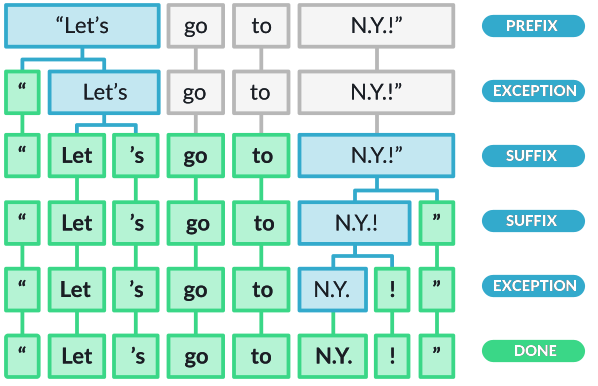
in the above by default the spacy applies tagger, parser, ner. The steps however can be added or replaced.

first step is tokenization
text="Mission impossible is one of the best movies I have watched. I love it."
print("{:10}|{:15}|{:15}|{:10}|{:10}|{:10}|{:10}|{:10}"
      .format("text", "lemmatization", "partofspeech", "TAG", "DEP", "SHAPE", "ALPHA", "STOP"))
doc = nlp(text)
for token in doc:
  print("{:10}|{:15}|{:15}|{:10}|{:10}|{:10}|{:10}|{:10}"
        .format(token.text, token.lemma_, token.pos_, token.tag_, token.dep_,token.shape_, token.is_alpha, token.is_stop))

# text      |lemmatization  |partofspeech   |TAG       |DEP       |SHAPE     |ALPHA     |STOP
# Mission   |mission        |NOUN           |NN        |nsubj     |Xxxxx     |         1|         0
# impossible|impossible     |ADJ            |JJ        |amod      |xxxx      |         1|         0
# is        |be             |AUX            |VBZ       |ROOT      |xx        |         1|         1
# one       |one            |NUM            |CD        |attr      |xxx       |         1|         1
# of        |of             |ADP            |IN        |prep      |xx        |         1|         1
# the       |the            |DET            |DT        |det       |xxx       |         1|         1
# best      |good           |ADJ            |JJS       |amod      |xxxx      |         1|         0
# movies    |movie          |NOUN           |NNS       |pobj      |xxxx      |         1|         0
# I         |I              |PRON           |PRP       |nsubj     |X         |         1|         1
# have      |have           |AUX            |VBP       |aux       |xxxx      |         1|         1
# watched   |watch          |VERB           |VBN       |relcl     |xxxx      |         1|         0
# .         |.              |PUNCT          |.         |punct     |.         |         0|         0
# I         |I              |PRON           |PRP       |nsubj     |X         |         1|         1
# love      |love           |VERB           |VBP       |ROOT      |xxxx      |         1|         0
# it        |it             |PRON           |PRP       |dobj      |xx        |         1|         1
# .         |.              |PUNCT          |.         |punct     |.         |         0|         0
# I you do not understand sonething
print(spacy.explain('nsubj')) #nominal subject
print(spacy.explain('pobj')) #object of preposition
# print entities
- Extracting the Named Entities
text="Narendra Modi is the PM of India which is a country in the continent of Asia"
doc = nlp(text)
for token in doc.ents:
  print(token)
# Output
# Narendra Modi
# India
# Asia
- If you want to see a colourful version of the named entities then,
from spacy import displacy
text="Narendra Modi is the PM of India which is a country in the continent of Asia which embraces Machine Learning"
doc=nlp(text)
displacy.render(docs=doc, style="ent",jupyter=True)
spacy.explain('GPE') #Geo Political Entity
NLP Text Vectorization
Convertion of raw text into numerical form is called Text Vectorization. Machine learning expects text in numerical form. This is also called Feature Extraction. Many ways of achieving feature extraction:
- One Hot Encoding
- Count Vectorizer
- TF-IDF
- Word Embeddings
One Hot Encoding
Every word including symbols are written in the vector form. This vector will only have 0 & 1s. each word is written or encoded as a one hot vector, each word will have different vector representation. example:
| Color | Red | Blue | Green |
|---|---|---|---|
| Red | 1 | 0 | 0 |
| Blue | 0 | 1 | 0 |
| Green | 0 | 0 | 1 |
| Red | 1 | 0 | 0 |
| Green | 0 | 0 | 1 |
corpus = ['dog eats meat','man eats meat']
from sklearn.preprocessing import OneHotEncoder
one_hot = OneHotEncoder()
all_in_one = [indi.split() for indi in corpus]
one_hot.fit_transform(all_in_one).toarray()
#Output
# [['dog', 'eats', 'meat'], ['man', 'eats', 'meat']]
# array([[1., 0., 1., 1.],
#        [0., 1., 1., 1.]])
we generally dont use the scikitlearn onehotencoding directly as it’s mainly for structured data not for unstructured data.
Disadvantages
- Size of the one hot encoding is propotional to the size of the vocabulary.
- Sparse representation of data
- Insufficent in storing, computing and learning from data.
- No sequence of words is considered and is ignored.
- If words outside the vocabulary exists there is no way to deal with it.
- Word context is not considered in the representation.
Bag of Words technique (BoW)
NLP pipeline has multiple steps as mentioned above. This step comes in the feature engineering step. Classical text represenation technique. Representation of the text under the consideration of bag of words. Text is characterised by a unique set of words. e.g. movie was bad; movie was excellent. This is characterised by the unique set of words not based on where it occurs in the sentence. so if the word bad it will be in one bag and excellent it will be in a different bag.
Application: Sentiment analysis (positive and negative sentiments). Harry potter was good, a movie was good - they are classified into the same bag.
Write your own Bow Representation
# if you are adventrous and dont want to use the Count Vectorizer.
import pandas as pd
import re
t1 = "dog eats meat everyday!"
t2 = "mAn eats meat once in a while."
t3 = "man, eaTs dog rarely!!!"
sentences = [re.sub(r"[^a-zA-Z0-9]", " ", t1.lower()).split(),
             re.sub(r"[^a-zA-Z0-9]", " ", t2.lower()).split(),
             re.sub(r"[^a-zA-Z0-9]", " ", t3.lower()).split()]

all_words = [word for words in sentences for word in words] # return variable - then first for.. then second for
unique_words = set(all_words)

def bow(all, sentences):
  results = []
  for sentence in sentences:
    result = {word: 0 for word in all}
    for word in sentence:
      result[word] = 1
    results.append(result)
  print(pd.DataFrame(results))

bow(all_words, sentences)
# Output
# dog  eats  meat  everyday  man  once  in  a  while  rarely
# 0    1     1     1         1    0     0   0  0      0       0
# 1    0     1     1         0    1     1   1  1      1       0
# 2    1     1     0         0    1     0   0  0      0       1
Disadvantages:
- Size of the vector increases with the size of the vocabulary
- Sparsity (property of being scattered) is still an issue.
- Does not capture the similarity between words (not context aware). ‘I eat’, ‘I ate’, ‘I ran’ Bag of Words Vectors for all the three documents will be equally apart - in layman terms - ’eat and ran’ and ’eat and ate’ will be same distance apart.
# use the countvectorize or just write your own python code after finding the unique words
from sklearn.feature_extraction.text import CountVectorizer
import re
import pandas as pd
t1 = "dog dog dog dog, dog eats meat everyday!"
t2 = "man eats meat once in a while."
t3 = "man eaTs dog rarely!!!"
sentences = [re.sub(r"[^a-zA-Z0-9]", " ", t1.lower()),
             re.sub(r"[^a-zA-Z0-9]", " ", t2.lower()),
             re.sub(r"[^a-zA-Z0-9]", " ", t3.lower())]
all_words = [word for words in sentences for word in words] # return variable - then first for.. then second for
unique_words = set(all_words)
# vectorizer = CountVectorizer(binary=True) --> use this for sentiment analysis
vectorizer = CountVectorizer()
X = vectorizer.fit_transform([t1, t2, t3])
print(sentences)
bag_of_words = X.toarray()
feature_names = vectorizer.get_feature_names_out()
pd.DataFrame(bag_of_words, columns=feature_names)
# Output
# dog	eats	everyday	in	man	meat	once	rarely	while
# 0	5	1	1	0	0	1	0	0	0
# 1	0	1	1	1	1	1	1	0	1
# 2	1	1	0	0	1	0	0	1	0
Note: vectorizer = CountVectorizer(binary=True)``` if you dont want actual counts but just 1s and 0s. This is a technique used specific to sentiment classification
Now even if you want it as a unigram, bigram and trigram thats also possible.
from sklearn.feature_extraction.text import CountVectorizer
import re
import pandas as pd
t1 = "dog dog dog dog, dog eats meat everyday!"
t2 = "mAn eats meat once in a while."
t3 = "man, eaTs dog rarely!!!"
sentences = [re.sub(r"[^a-zA-Z0-9]", " ", t1.lower()),
             re.sub(r"[^a-zA-Z0-9]", " ", t2.lower()),
             re.sub(r"[^a-zA-Z0-9]", " ", t3.lower())]
all_words = [word for words in sentences for word in words]
unique_words = set(all_words)
vectorizer = CountVectorizer(ngram_range=(1,3)) # See here <--
X = vectorizer.fit_transform(sentences)
bag_of_words = X.toarray()
feature_names = vectorizer.get_feature_names_out()
print("Feature Names (Vocabulary):", feature_names)
print("Bag of Words Representation:")
pd.DataFrame(bag_of_words)
#Output
# Feature Names (Vocabulary): ['dog' 'dog dog' 'dog dog dog' 'dog dog eats' 'dog eats' 'dog eats meat'
#  'dog rarely' 'eats' 'eats dog' 'eats dog rarely' 'eats meat'
#  'eats meat everyday' 'eats meat once' 'everyday' 'in' 'in while' 'man'
#  'man eats' 'man eats dog' 'man eats meat' 'meat' 'meat everyday'
#  'meat once' 'meat once in' 'once' 'once in' 'once in while' 'rarely'
#  'while']
# Bag of Words Representation:
# 0	1	2	3	4	5	6	7	8	9	...	19	20	21	22	23	24	25	26	27	28
# 0	5	4	3	1	1	1	0	1	0	0	...	0	1	1	0	0	0	0	0	0	0
# 1	0	0	0	0	0	0	0	1	0	0	...	1	1	0	1	1	1	1	1	0	1
# 2	1	0	0	0	0	0	1	1	1	1	...	0	0	0	0	0	0	0	0	1	0
# 3 rows × 29 columns
Pros and Cons
- has the ability to capture the context and word order information in the form of n-grams
- Documents having the same ngrams will have vectors closer to each other in euclidean space as compared to documents with different ngrams.
- As n increased the dimensionlity (sparsity) increases
- issue related to out of vocabulary problem exists
TF-IDF
- a word most repeated in one document but not in any other documents are considered more important. Stop words however dont fall into this category.
- Term Frequency (TF) * Inverse Document Frequency (IDF)
- quantify a word in a set of documents.
- importance of words in the given context is represented here.
Terminology t - term d - document (set of words) N - count of corpus corpus - the total document set. e.g. ‘This Dress is so beautiful’ - how is the computer to know that the important words here are dress and beautiful? thats where TF*IDF shines.
- TF - number of times a particular word appears in a sentence. e.g. Sun rises in East; frequency of Sun - 1/4
- IDF - Dress is beautiful; is isn’t adding any importance. stop words needs to be weightage reduced particularly when these words are used more freqently it’s importance will increase. IDF measures the informativeness of term t. it will be low for stop words. inverse document frequency
formula: idf(t) = log(N/(df+1))
IDF(word)=log10(total number of documents/ (1+number of documents containing the word))
hence, TF-IDF formula: tf-idf(t,d) = tf(t,d) * log(N/(df+1)) where, N - total number of documents in the corpus & df - number of document with term t.
e.g. lets say sentences:
import math
s1='man eats pizza'
s2='dog eats food'
s3='ant eats pizza'
# for man in s1 → tf = 1/3
# idf = log₂(3/1)
tf = 1/3
idf = math.log(3/2)
tf_idf = tf *  idf
print(tf_idf) # 0.13515503603605478
# for eats in s1 → tf = 1/3
tf = 1/3
idf = math.log(3/4)
tf_idf = tf*idf
print(tf_idf) #-0.09589402415059363
# hence eats is not a very important word.
tf-idf hands on
import pandas as pd
import math
import sklearn
import nltk
from nltk.corpus import stopwords
nltk.download('stopwords')
stop_words = stopwords.words('english')
first_sent = "Data science is an amazing career in the current world"
second_sent = "Deep learning is a subset of machine learning"
first_sent = [word for word in first_sent.split() if word not in stop_words]
second_sent = [word for word in second_sent.split() if word not in stop_words]
vocabulary = set(first_sent).union(set(second_sent))
word_dict1 = dict.fromkeys(vocabulary, 0)
word_dict2 = dict.fromkeys(vocabulary, 0)
for word in first_sent:
  word_dict1[word] += 1
for word in second_sent:
  word_dict2[word] += 1
# Count Vectorization representation.
df = pd.DataFrame([word_dict1,word_dict2])

# Term Frequency - number of occurances of the word/total number of words
freq1 = {}
freq2 = {}
for word in vocabulary:
  freq1[word] = word_dict1[word]/len(first_sent)
  freq2[word] = word_dict2[word]/len(second_sent)

pd.DataFrame([freq1, freq2])
implement the tf-idf using scikit
it is supposed to be something like this. Below isn’t fully working need to check why.
import pandas as pd
import math
import sklearn
import nltk
from nltk.corpus import stopwords
nltk.download('stopwords')
stop_words = stopwords.words('english')
first_sent = "Data machine science is an amazing career in the current world"
second_sent = "Deep learning is a subset of machine learning"
first_sent = [word for word in first_sent.split() if word not in stop_words]
second_sent = [word for word in second_sent.split() if word not in stop_words]
vocabulary = set(first_sent).union(set(second_sent))
word_dict1 = dict.fromkeys(vocabulary, 0)
word_dict2 = dict.fromkeys(vocabulary, 0)
for word in first_sent:
  word_dict1[word] += 1
for word in second_sent:
  word_dict2[word] += 1
# Count Vectorization representation.
df = pd.DataFrame([word_dict1,word_dict2])

def calculateTF(doc):
  # To be implemented
  pass

def calculateIDF(docs):
  # To be implemented
  pass

def calculateTFIDF(tfBagOfWords, idfs):
  print(idfs)
  tfIdf = {}
  for word, value in tfBagOfWords.items():
    tfIdf[word] = value*idfs[word]
  return tfIdf

# Term Frequency - number of occurances of the word/total number of words
pd.DataFrame([
    calculateTFIDF(calculateTF(word_dict1), calculateIDF([word_dict1, word_dict2])),
    calculateTFIDF(calculateTF(word_dict2), calculateIDF([word_dict1, word_dict2]))
    ])
implement using sklearn
import sklearn
import pandas as pd
from sklearn.feature_extraction.text import TfidfVectorizer
first_sent = "Data science is an amazing career in the current world"
second_sent = "Deep learning is a subset of machine learning"
vec = TfidfVectorizer()
result = vec.fit_transform([first_sent, second_sent])
pd.DataFrame(result.toarray(), columns=vec.get_feature_names_out())
# Output
# amazing	an	career	current	data	deep	in	is	learning	machine	of	science	subset	the	world
# 0	0.324336	0.324336	0.324336	0.324336	0.324336	0.000000	0.324336	0.230768	0.000000	0.000000	0.000000	0.324336	0.000000	0.324336	0.324336
# 1	0.000000	0.000000	0.000000	0.000000	0.000000	0.342871	0.000000	0.243956	0.685743	0.342871	0.342871	0.000000	0.342871	0.000000	0.000000
Pros and cons of the tf-idf technique
Advantages
- use this to calculate the similarity between two texts using similarity measures like Cosing similarity/Euclidean distance
- has application in text classification, information retrieval etc.
- better than earlier methods.
Disadvantages
- high dimentionality
- They are still discrete representation of units of text, hence unable to capture relation between words
- sparse and high dimension
- cannot handle OOV (Out of Vocabulary) words.
TBC
https://www.youtube.com/watch?v=tFHeUSJAYbE&list=PLz-ep5RbHosU2hnz5ejezwaYpdMutMVB0
Large Language Models (LLMs)
is a type of Language Model. Quantatively it is the number of model parameters vary from 10 to 100 billion parameters per model. Qualitatively also called emergent properties starts emerging - properties in large language model that do not appear in small language models, e.g. zero shot learning - capability of a model to complete a task it is not explicitely trained to do.
In the earlier days the model was trained using supervised learning we use thousands if not millions of examples - but with LLMs we use self-supervised learning. Train a very large model in a very large corpus of data. In self-supervised learning doesn’t require manual labelling of each example. The labels or the targets of the model defined from the inherent structure of the data itself.
One of the popular way of doing this is “next word prediction paradigm”. There is not just one word but many that can go after listen to your….. What the llm would do is to use probablistic distribution of next word given the previous word. in the above example the words could be heart or gut or body or parents etc.. each with different probability distribution. Its essentially trained on a large set of data with so many examples of corpus of data - so it can statistically predict the next set of data. Important thing is the context matters - if for example we add the word don’t in front of listen to your…, the probably distribution will entirely change.
Autoregression Task formula: P(tn | tn-1,…, tn-m) P(tn) given n tokens.
This is how LLMs like chatgpt works.
3 levels of Using LLMs
- Level 1: Prompt Engineering
- using LLM out of the box - not changing any model parameters. Two ways to do this
- using an agent like chatgpt
- using open AI API or hugging face tranformers library: help to interact with LLMs programmatically using python for example. Pay per api call in case of open API. Hugging face transformer library is an open source option, you can run the models locally in this case so no need to send your proprietary data into 3rd party or open ai.
- using LLM out of the box - not changing any model parameters. Two ways to do this
- Level 2: Model Fine Tuning
- adjusting model parameters for a particular tasks.
- steps
- Step 1: pre-trained models are obtained. (usually trained by self supervised learning). in this step the base model is learning useful representations for a wide variety of tasks.
- Step 2: update model parameters given task-specific examples (trained by supervised learning or even reinforcement learning).e.g. chatgpt, the model we use here is a fine tuned model learnt by reinforcement learning. Some techniques is lora or low range adaptation. another technique is reinforcement learning based on human feedback (RLHF).
- Step 3: Deploy the fine tuned large language model.
- Level 3: Build your own.
- This is only for 1% of all usecases.
- One example usecase: in a large company we dont want to use open source models where security is a concern, dont want to send data to 3rd party via an API.
- Another usecase is you want to create your own model and commercialize it.
- At a high level steps are:
- get the data or corpus.
- pre process and refine it
- model training
- pre trained llm.
- then go to step 2.
Connecting to AI using API, Programmatically
OpenAIs Python API
It’s similar to chatGPT but with Python. In both we pass a request and use the language modelling to predict the next word. Apart from the difference in the web interface in chatgpt and here programmatically some differences are as follows. most of the below aren’t possible with chatgpt but programmatically possible with openai python.
- Customizable System message: Message or prompt or a set of instructions that help define the tone, personality and functionality of the model during a conversation. This helps model how to respond to user input and what constraints to follow. I customized the message in chatgpt first to give back sarcastic answers.

 Then i changed the message to give negative and dark response. This time the results were entirely opposite.

- Adjust input parameter
- max response length: response length sent back by model
- number of responses: (number of outputs you may want to programmatically select one of the response e.g.)
- temperature: randomness of response generated by the model.
- Process image and other types
- extact helful word embeddings for downstream tasks
- input audio for transcription and tranlations
- model fine tuning functionality.
- with chatgpt can only use GPT 3.5 or 4, with openai several other models are available read: https://platform.openai.com/docs/models
Costing:
Tokens & Pricing: same as tokenization above a given text is converted and represented as numbers. Pricing is based on the tokens, bigger prompts will incur larger costs. To use we have to get the Secret key to make API calls.
import openai
from openai import OpenAI
from sk import openai_key # my own file with a variable openai_key='sk-proj-4D1ID8ZeQ...'

client = OpenAI(api_key=openai_key)
response = client.chat.completions.create(
    model="gpt-3.5-turbo",
    max_tokens=2,
    temperature=2, # degree of randomness, 0 is predictable.
    n=3,
    messages=[
        {
            "role": "user",
            "content": "where there is a will there is a "
        }
    ]
)

for idx, choice in enumerate(response.choices):
    print(f"Response {idx+1}: {choice['message']['content']}")

# Output
# Response 1: way.
# Response 2: plan.
# Response 3: chance.
# note that 2 tokens - 'way' and '.'
Hugging face Transformer library
Major hub for open source Machine learning (ML) like Dockerhub for docker. It has models, dataset (its own data used to train models) and spaces (for building and deploying machine learning applications).
Transformers library
Downloading and training machine learning models in python. Like NLP, computer vision, audio processing etc. E.g. for sentiment analysis - find the model that does sentiment analysis classification task then you have to take raw text convert into numerical value that is then passed to the model; finally decode the numerical output of the output to get the label of the text. This can be done easily in the transformers library using a pipeline function. other things that can be done
- sentiment analysis
- summarization
- translation
- question-answering
- feature extraction
- text generation etc.
! pip install transformers
from transformers import pipeline
sentiment_pipeline = pipeline(task="sentiment-analysis")
# sentiment_pipeline = pipeline(task="sentiment-analysis", model="distilbert/distilbert-base-uncased-finetuned-sst-2-english")
texts = [
    """One is that the mining giant's shares are pushing higher this morning.
        In early trade, the Big Australian's shares are 1.5% higher to $45.74.
        This means that the BHP share price is now up 13% over the past two weeks."""
]
results = sentiment_pipeline(texts)
for text, result in zip(texts, results):
    print(f"Text: {text}\nSentiment: {result['label']}, Score: {result['score']}\n")
Question: How does it decide if a text is positive or negative without perception?
signup and logininto huggingface
- lookup for transformer tag and select a model. Then you will check also for pytorch tag. This is because hugging face also supports models which aren’t just compatible with pytorch and transformers but also others.
- The train button on the right will have options like Amazon Sagemaker, NVIDIA NDX Cloud, AutoTrain which will help jump start the model finetuning part.
Getting started
to get started copy the hf-env.yml file into your code repository.
conda env create --file hf-env.yml
another example for text-classification
from transformers import pipeline
classifier = pipeline(task="text-classification", model="SamLowe/roberta-base-go_emotions", top_k=None)
sentences = ["I am not having a great day"]
model_outputs = classifier(sentences)
print(model_outputs[0])
# Output
# [{'label': 'disappointment', 'score': 0.4666951894760132}, {'label': 'sadness', 'score': 0.39849498867988586}......
yet another example for summarization
from transformers import pipeline
summarizer = pipeline("summarization", model="Falconsai/text_summarization")
ARTICLE = """
Hugging Face: Revolutionizing Natural Language Processing....
"""
print(summarizer(ARTICLE, max_length=1000, min_length=30, do_sample=False))
>>> [{'summary_text': 'Hugging Face has emerged as a prominent and innovative force in NLP . From its inception to its role in democratizing AI, the company has left an indelible mark on the industry . The name "Hugging Face" was chosen to reflect the company\'s mission of making AI models more accessible and friendly to humans .'}]
Other transformers like Falconsai/text_summarization to use is the facebook/bart-large-cnn for text summarization.
finally, you can chain together multiple objects for example first do a text summarization and then do a sentiment analysis.
Another interesting task is conversational text. For this we can use the facebook/blenderbot-400M-distill. There is supposed to be a class called Conversation (also imported from transformers) which is supposed to be a container for conversation.
from transformers import pipeline

chatbot = pipeline(model="facebook/blenderbot-400M-distill")
conversation_history = "Hello, how are you?"
response = chatbot(conversation_history)
print(response)

# Continue the conversation
conversation_history += f" {response[0]['generated_text']}"
response = chatbot(conversation_history)
print(response)
There is a library called Gradio to make it conversational. Gradio is very similar to streamlit.
import gradio as gr
from transformers import pipeline

# Load the chatbot model
chatbot = pipeline(model="facebook/blenderbot-400M-distill")

# Function to handle chatbot conversation
def respond(user_input, history=[]):
    # Add the user input to the conversation history
    history = history or []
    history.append(f"User: {user_input}")
    print(history)
    # Generate a response
    response = chatbot(user_input)
    bot_reply = response[0]['generated_text']
    print(bot_reply)

    # Add the bot reply to the history
    history.append(f"Bot: {bot_reply}")

    # Return the entire conversation history as a string
    return "\n".join(history), history

# Create the Gradio interface
demo = gr.Interface(
    fn=respond,  # The function that processes input
    inputs=[gr.Textbox(label="Your Message here:"), gr.State([])],  # Input is a message and conversation history
    outputs=[gr.Textbox(label="Response here:"), gr.State([])],  # Output is updated conversation and history
    title="AI Chatbot"
)

# Launch the interface
demo.launch()
 you can post this in hugging face spaces or hf.co/spaces. They allow to create ML applications and host it here.
example of this Llama chatbot.
you can post this in hugging face spaces or hf.co/spaces. They allow to create ML applications and host it here.
example of this Llama chatbot.
- Go to hf.co/spaces and click on create new space.
- follow the instructions to clone the repo and push your code.
Prompt Engineering
What is Prompt Engineering
Prompt engineering refers to the process of designing and refining the input (or “prompt”) given to an AI language model, like GPT, to produce desired outputs. It’s kind of the future of computer programming in Natural Language. Language models are not designed to peform a task, all that it does is to predict the next token, thus you can trick the model into solving your problem. Example of a prompt:
---

**Prompt:**

You are an intelligent system that processes natural language queries and selects the most relevant SQL query from a given list. Based on the user's question, match the correct SQL query that will retrieve the desired information from the database.

**Input:**

- **User Query (NLP):** The user asks a question in natural language, describing the data they want from the database.
- **SQL Queries List:** A list of SQL queries is provided as possible answers.

**Task:**

- Analyze the user's natural language question.
- Select the most appropriate SQL query from the list that best answers the user's question.

**Example:**

- **User Query:** "What are the names and email addresses of all customers who made a purchase in the last 30 days?"
- **SQL Queries List:**
    1. `SELECT * FROM customers WHERE purchase_date > '2023-09-01';`
    2. `SELECT name, email FROM customers WHERE purchase_date > NOW() - INTERVAL 30 DAY;`
    3. `SELECT id, name FROM orders WHERE status = 'complete';`
    4. `SELECT email FROM customers WHERE created_at > NOW() - INTERVAL 1 YEAR;`

**Expected Output:**

- The system should select query 2: `SELECT name, email FROM customers WHERE purchase_date > NOW() - INTERVAL 30 DAY;`
Two ways of implementing Prompt Enginner
- Easy way - using an Agent like ChatGPT. You can’t really use it to integrate it into another app.
- Programmatically integrate using python or similar.
7 Tricks for prompt engineering
- Be Descriptive - give a context around the problem
- Give Examples
- Use Structured Text
give me the recipe for making chocolate cookies, give it in the format **Title**: Chocolate Cookie Recipe **Description**: ....... - Chain of Thoughts
Make me a resume for a job application at Google. Step 1: Write an objective Step 2: Write an introduction about my overall work experience. they are... Step 3: Write in detail each experience. Step 4: Summary and conclusion. - Chatbot personas:
Act as an travel guide who knows everything about Sydney. Make me a travel itenaryfor weekend in Sydney in your Aussie Accent. - Flipped Approach:
The generic response might not be of interest to you hence we have depend on a conversational model. This is useful when you dont know what exactly you want. e.g.
I want you to ask me questions to help me come up with an LLM based application idea. Ask me one question at a time to keep things conversational.. - Reflective, Review and Refine
ChatGPT v/s GPT3.0
ChatGPT is a finetuned model - easy to get useful responses, however with GPT 3.0 that isn’t the case and more work is to be done on prompt engineering side - it just does work prediction.
LangChain
LangChain is a framework designed to help developers build applications that leverage language models (like GPT) more effectively by integrating them with other tools, data sources and workflows. It simplifies the process of creating applications that combine various natural language processing tasks with external data, APIs and user interactions.
pip install langchain
pip install langchain-community langchain-core
pip install huggingface_hub
from langchain import HuggingFaceHub # or use openai
from langchain.prompts import PromptTemplate
from langchain.chains import LLMChain
import os

os.environ['HUGGINGFACEHUB_API_TOKEN'] = '<your hf token>'
hugging_face_llm = HuggingFaceHub(repo_id="google/flan-t5-base", model_kwargs={"temperature": 0.5})

prompt_template = PromptTemplate(
    input_variables=["question"],
    template="""You are the teacher and you are running a surprise test to see who are the attentive kids.
    The questions will be in the form
    :\nQuestion: {question}"""
)

qa_chain = LLMChain(llm=hugging_face_llm, prompt=prompt_template)
question = "What is the capital of France?"
response = qa_chain.run({"question": question})
print(response)

question = "What is the name of indias PM?"
response = qa_chain.run({"question": question})
print(response)

# Output
# Paris
# Narendra Modi
Model fine Tuning
A smaller fine tuned model can outperform a larger base model. This involves taking an existing or pre-trained model like GPT 3 for a specific usecase like ChatGPT (GPT-3.5-turbo). 3 ways to fine tune:
- Self Supervised learning
- you get the Training Corpus of data can cater to your usecase.
- you then use this corpus of text and you train the model in a self supervise way.
- Supervised Learning
- here you have a set of inputs and outputs e.g. feed in who is the 35th president of the US? and output JFK.
- So having these question answer pairs we can train the model how to answer questions.
- One way of doing this is via prompt templates.
Please answer the following questions Q: {Question} A: {Answer} - Through this process we could translate the training data set to a series of prompts and generate a training corpus and go back to the self supervised process.
- Reinforcement Learning -
Supervised Fine tunning, two steps:
- curating your training dataset
- Fine tuning the model.
- done in 5 steps:
Choose fine tuning task. it could be anything e.g.
- could be text summarization
- could be text generation
- text/binary classification what ever you want to do..
Prepare training dataset.
- e.g. if text summarization then the input/output pairs of text in desired summarization generate a training corpus using for e.g. a prompt template
Choose a base model.
- lots of foundantal llms for e.g. or fine tuned llms.
- use this as the starting point.
Fine-tune model via supervised learning
There are 3 different options:
- retrain all the parameters: here we tweak all the parameters, the computation cost is very very very high.
- transfer learning: here we freeze most of the parameters only fine tune the head. cheaper than full retaining all the parameters.
- Parameter Efficient Fine Tuning (PEFT): here we freeze all the weights or parameters. Instead we augment the model with additional parameters that are trainable. Advantage is we can fine tune the model with a relatively small set of model parameters as against the above approaches.
One of the ways to do this is LoRA (Low Rank Adaptation). In short fine tune model by adding new trainable parameters. the first component here h(x) = Wox is what looks like a model without LoRA. Wo has weights that are all trainable. her Wo is a d by k (dxk) matrix with d*k trainable parameters. e.g. d=1000, k=1000 Wo is a 1,000,000 trainable parameters. But with LoRA the ΔWx, another weight matrix with the same shape as Wo.
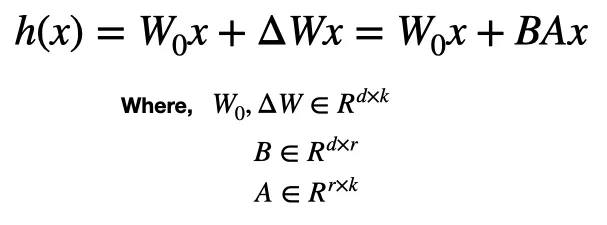
To simplify things lets just represent ΔW as a product of two terms B and A (BA) hence we can represent ΔW in terms of a 2 one dimentional arrays or vectors A and B, which essentially generates the new h(x). In this case Wox itself if frozen but B and A are trainable. hence in the above context d = 1000 and k = 1000 hence (dr)+(rk) for intrensic rank or r = 2 which translates into 4000 trainable parameters as against the million parameters.
Evaluate the model performance.
Train Reward model
- generating a score for language models completetion. highscore for correct answer and low score for an incorrect answer.
- start with a prompt pass it into supervised fine tuned model. this you do multiple times and then assign human labels and then use the ranking to train the rewards model.
Reinforcement learning with Favourite algorithm
- example in the case of ChatGPT it uses PPO or Proximal Policy Optimization
- you give the prompt and pass it into supervised fine tuned model and pass it back to reward model. The reward model then will give feedback to the finetuned model, this is how you update the model parameters.
Practical Supervised Fine tuning
First thing first These are some of the classes and it’s uses.
| Class | Description |
|---|---|
AutoModel | Automatically loads a pre-trained model for various tasks. |
AutoModelForSequenceClassification | Loads a model specifically for sequence classification tasks. |
AutoModelForTokenClassification | Loads a model for token classification tasks (e.g., NER). |
AutoModelForQuestionAnswering | Loads a model for question answering tasks. |
AutoModelForCausalLM | Loads a model for causal language modeling tasks (e.g., text generation). |
AutoModelForMaskedLM | Loads a model for masked language modeling tasks. |
AutoModelForImageClassification | Loads a model for image classification tasks. |
AutoTokenizer | Automatically loads a tokenizer corresponding to a pre-trained model. |
AutoFeatureExtractor | Loads a feature extractor for models that require image preprocessing. |
AutoConfig | Loads configuration settings for a model. |
AutoPipeline | Automatically creates a pipeline for various tasks using a model. |
AutoModelForSpeechSeq2Seq | Loads a model for speech-to-text sequence generation tasks. |
AutoModelForAudioClassification | Loads a model for audio classification tasks. |
AutoModelForSeq2SeqLM | Loads a model for sequence-to-sequence tasks (e.g., translation). |
AutoModelForImageSegmentation | Loads a model for image segmentation tasks. |
AutoModelForImageToText | Loads a model for image-to-text generation tasks. |
AutoModelForTextToImage | Loads a model for text-to-image generation tasks. |
AutoModelForTextClassification | A more general class for text classification tasks. |
AutoModelForConversational | Loads a model designed for conversational tasks. |
ChatGPT generated code for Sentiment analysis and then Finetuning using LoRA.
you can upload your dataset into huggingface like in here.
 you can access it using
import torch
from transformers import AutoTokenizer, AutoModelForSequenceClassification, Trainer, TrainingArguments
from peft import get_peft_model, LoraConfig, TaskType

# Load the tokenizer and base model
model_name = "distilbert-base-uncased-finetuned-sst-2-english"
tokenizer = AutoTokenizer.from_pretrained(model_name)
model = AutoModelForSequenceClassification.from_pretrained(model_name, num_labels=2)

# Define LoRA configuration
lora_config = LoraConfig(
    r=4,                   # Intrinsic rank
    lora_alpha=32,        # Scaling factor
    lora_dropout=0.01,    # Dropout rate
    target_modules=["q_lin"],  # Target modules for LoRA
    task_type=TaskType.SEQ_CLS
)

# Wrap the model with LoRA
lora_model = get_peft_model(model, lora_config)

# Example training data
train_texts = [
    "It was good.",
    "Not a fan, don't recommend.",
    "Better than the first one.",
    "This is not worth watching even once.",
    "This one is a pass."
]
train_labels = [1, 0, 1, 0, 0]  # Example labels corresponding to the texts

# Example evaluation data
eval_texts = [
    "A fantastic experience!",
    "Horrible movie, would not watch again.",
]
eval_labels = [1, 0]  # Example labels for evaluation

# Tokenize the training and evaluation data
train_encodings = tokenizer(train_texts, truncation=True, padding=True, return_tensors="pt", max_length=512)
eval_encodings = tokenizer(eval_texts, truncation=True, padding=True, return_tensors="pt", max_length=512)

# Create PyTorch datasets
class SentimentDataset(torch.utils.data.Dataset):
    def __init__(self, encodings, labels):
        self.encodings = encodings
        self.labels = labels

    def __getitem__(self, idx):
        item = {key: val[idx] for key, val in self.encodings.items()}
        item['labels'] = torch.tensor(self.labels[idx])
        return item

    def __len__(self):
        return len(self.labels)

# Create datasets
train_dataset = SentimentDataset(train_encodings, train_labels)
eval_dataset = SentimentDataset(eval_encodings, eval_labels)

# Define training arguments
training_args = TrainingArguments(
    output_dir="./lora_finetuned_model",
    evaluation_strategy="epoch",
    learning_rate=5e-5,
    per_device_train_batch_size=2,
    per_device_eval_batch_size=2,  # Add eval batch size
    num_train_epochs=3,
    weight_decay=0.01,
)

# Define Trainer
trainer = Trainer(
    model=lora_model,
    args=training_args,
    train_dataset=train_dataset,
    eval_dataset=eval_dataset,  # Provide eval dataset
)

# Fine-tune the model
trainer.train()

# Save the fine-tuned model
trainer.save_model("./lora_finetuned_model")


eval_texts = [
    "An absolutely stunning film! The visuals were breathtaking and the storyline kept me engaged the entire time.",
    "I was really disappointed with this film. The plot was weak and the characters were poorly developed."....
]

# Get predictions
predicted_sentiments = predict_sentiment(eval_texts)

# Print the results
for text, sentiment in zip(eval_texts, predicted_sentiments):
    print(f"Text: \"{text}\" - Sentiment: {sentiment}")